
Your desk is more than just a workspace—it’s where focus, creativity, and productivity come together. The right gadgets can transform it from ordinary to extraordinary, whether you’re streaming, studying, or working from home. From smart lighting and pro-level webcams to sleek charging stations and clutter-busting tools, these innovative picks are designed to make your setup more efficient, comfortable, and inspiring. In this guide, we’ve rounded up 30 desk gadgets that not only look great but also solve real problems—so you can work smarter, stay organized, and actually enjoy the time you spend at your desk.
List of 30 Products:
1. Elgato Stream Deck MK.2

Meet the compact command center built for creators and doers. With 15 customizable LCD keys, you can launch apps, switch scenes, post updates, mute your mic, adjust audio, or light up your studio—all with a single tap and instant visual feedback. Set custom icons, stack actions, and build folders and profiles that auto-switch with your active app. It plays beautifully with OBS, Twitch, YouTube, Discord, Spotify, Philips Hue, Elgato 4KCU, and more. Whether you’re streaming, editing, recording, or presenting, hotkey actions keep your workflow fluid and your focus on what matters: your craft. No more hunting for shortcuts or menus—just tap, create, and stay in the zone. Make every button yours and let muscle memory power your day.
2. BenQ ScreenBar Halo Monitor Light

Long hours at your screen shouldn’t mean tired eyes. ScreenBar Halo brings balanced, glare-free illumination with an integrated back light that softens contrast between your monitor and room, helping you stay comfortable and focused. Its upgraded asymmetrical front light keeps reflections off your display, while three eye-care modes let you use the front, back, or both lights together. Fine-tune brightness and color temperature with the smart wireless controller—over 100 stepless levels—and save your favorite setting for instant recall. Powered by USB and mounted with a patented clip, it frees precious desk space and eliminates lamp clutter. The 1.5 m cable keeps setup simple. Designed to fit most monitors, it supports bezels ≥0.25″ and thickness up to 2.36″ for flat screens or 1.5″ for curved displays over 1000R. Note: complex, non-planar backs may affect mounting. Create a calmer, clearer workspace and stay in your flow.
3. TourBox Elite

Meet TourBox Elite—the tactile controller that helps you stay in your creative flow. With dual-channel Bluetooth and responsive haptic feedback, every dial, knob, and scroll gives you precise, intuitive control for video editing, color grading, photo retouching, and illustration. Jump through timelines, fine-tune color with the Console 5 color panel, or adjust brush size, opacity, and canvas rotation—all without breaking focus. It pairs seamlessly with tools you already use, including Premiere Pro, Final Cut Pro, DaVinci Resolve, Photoshop, Lightroom, Capture One, Blender, and more. Customize every button, create macros, and build screen menus tailored to your workflow, so repetitive tasks become effortless, and your ideas move faster from mind to screen. Comfortable to use alongside drawing tablets, with a fingerprint-resistant finish, TourBox Elite keeps your hands in command and your creativity front and center.
4. Elgato Key Light

Meet the light that adapts to you. With built-in Wi‑Fi, you can switch on, dim, and fine-tune from your desktop, so your focus never breaks. Pump out up to 2800 lumens to brighten an entire room, then smoothly fade to a whisper when you’re winding down. Dial color temperature from a cozy 2900 K sunset to a crisp 7000 K daylight to match your mood, your skin tone, or the story you’re telling. Behind the scenes, 160 OSRAM LEDs deliver consistent output with impressively low heat—perfect for long shoots and marathon work sessions. The opal glass face spreads light evenly for soft, glare-free illumination that flatters on camera and feels easy on the eyes. Create your ideal atmosphere, stay comfortable, and keep creating—day or night.
5. AFMAT Cordless Air Duster

Meet your reusable burst of clean. The AFMAT Cordless Air Duster delivers up to 28 m/s airflow from a 33,000 RPM motor to lift microscopic dust from keyboards, PCs, cameras, and delicate circuit boards. The 6000 mAh rechargeable battery runs for about 30 minutes per charge and tops up in roughly 3 hours via USB—often with the same cable as your Android phone. Ditch single-use cans; this eco-friendly tool is reusable over 5,000 times. A full-palm grip and retractable nozzle keep cleaning comfortable and precise. Choose your flow: press and hold for quick bursts or double-press for continuous power. Whether you’re protecting your rig, preserving your instruments, or keeping your workspace zen, this compact duster helps you care for the tech that powers your life.
6. Logitech Litra Glow

Great lighting isn’t about vanity—it’s about being seen clearly and feeling confident. Logitech Litra Glow brings studio-quality illumination to your desk with a frameless diffuser that spreads soft, flattering light and tames harsh shadows. TrueSoft full‑spectrum LEDs deliver natural skin tones and cinematic color accuracy, so you look like you—on any platform. Dial in your vibe with quick controls for brightness and color temperature, from cozy warm to crisp cool. The patent‑pending 3‑way monitor mount lets you fine‑tune height, tilt, and rotation for perfect placement on a laptop or desktop. And because long sessions happen, Litra Glow is tested to be safe and comfortable for all‑day streaming and meetings. Whether you’re teaching, creating, gaming, or catching up with your team, Litra Glow helps you show up with clarity, warmth, and confidence—every time you go live.
7. Razer Kiyo Pro Ultra

Meet Kiyo Pro Ultra—a webcam that brings DSLR-like clarity to your calls and streams. Its large 1/1.2″ Sony STARVIS 2 sensor with 2.9 μm pixels and bright F/1.7 lens capture more light for clean, true-to-life color, even after sundown. AI-powered face tracking and exposure keep you sharp and well lit. Create natural depth with optical background blur—no extra software. Stream the way you want: HDR at 30 fps, uncompressed 4K at 24 fps, plus 1440p 30 and 1080p 60 for buttery motion. Dial in your look with advanced controls and save your setup to onboard memory for any studio or on-the-go shoot. Works seamlessly with Windows (full software features) and plugs right into macOS for effortless capture. Make every meeting, lesson, or stream feel more human.
8. Razer Leviathan V2 PC Soundbar

Bring your desk to life with a compact soundbar that sounds bigger than it looks. Dual full-range drivers and a down-firing subwoofer deliver crisp highs, rich mids, and desk-shaking bass, while THX Spatial Audio (7.1) places every footstep and note exactly where it should be. Designed to sit neatly beneath your monitor, it stays out of the way—detachable rubber feet angle audio right toward you. Switch seamlessly from PC to phone or tablet with low-latency Bluetooth 5.2, pairing up to 8 devices via the Razer Audio App. Make it truly yours with Razer Chroma RGB: 18 lighting zones and dynamic in-game effects that match your world. Fine-tune everything—EQ, lighting, and more—through Razer Synapse and mobile apps. Whether you’re gaming, streaming, or focusing, this setup turns everyday moments into immersive experiences.
9. HyperX QuadCast S USB Microphone

Bring your voice to life with a mic that’s as expressive as you are. QuadCast S pairs vibrant, customizable RGB with broadcast-ready sound, so your stream, podcast, or game chat feels instantly professional. The built-in shock mount tames rumbles and bumps, while a tap-to-mute sensor with clear LED status keeps you in control during live moments. Switch among four polar patterns—cardioid for solo, bidirectional for interviews, stereo for rich ambience, or omnidirectional for roundtable chats. Dial in your sound with onboard gain control, and monitor in real time through the headphone jack. Personalize effects with HyperX Ngenuity and fit it easily to most stands or boom arms. Simple USB-C connectivity works seamlessly with PC, PS4, and Mac, and it plays nicely with OBS Studio, Streamlabs, and XSplit. Let your audience hear—and feel—your story.
10. Insta360 Link 2 PTZ 4K Webcam

Show up with clarity and confidence. Insta360 Link 2 pairs a large 1/2″ sensor with 4K HDR to deliver lifelike video, even in low light. Advanced AI noise canceling keeps your voice front and center, while blazing-fast PDAF locks focus so every moment stays sharp. Want that cinematic feel? Toggle natural bokeh in Link Controller. Move freely—Link 2 physically pans and tilts to track you or your team, and simple gestures or your phone handle zoom, framing, and Whiteboard Mode. Switch to DeskView for demos or 4K Portrait for socials in a click. Dive deeper with the free Link Controller app to fine-tune color, exposure, and more. When the meeting ends, Privacy Mode automatically tilts the camera down. And with seamless compatibility across Teams, Zoom, Twitch, and beyond, you’re ready to connect, teach, sell, and create—anywhere you open your laptop.
11. Quntis Monitor Light Bar PRO+ (with Remote)

Transform your desk into a calm, focused workspace with the Quntis ScreenLinear Classic Pro. Its smart, desktop remote lets you steplessly adjust brightness and color temperature (3000K–6500K, CRI95) to match your mood—morning clarity, late-night flow, or deep-focus sprints. The 45° asymmetrical optical design lights your keyboard and notes without casting glare on the screen, easing eye strain and helping you stay immersed. Built for almost any setup—flat, curved, or ultrawide—the weighted clip and dual adjustment cover fit monitors 0.12″–2.36″ thick, while the 45° rotating shaft fine-tunes coverage. Auto-dimming adapts to your room’s light with a double-click, and a 2‑hour rest timer gently nudges you to take a break. USB-powered, 20 inches long, and engineered with IEC62778 anti-blue light standards, it’s a thoughtful companion for students, designers, and anyone who lives at their screen.
12. Baseus Monitor Light Bar

Meet the monitor light bar that puts your eyes—and your focus—first. Its asymmetrical beam brightens your keyboard and workspace without washing out your screen, cutting glare and flicker so late nights feel easier on your eyes. Tap the touch sensor to fine-tune stepless brightness and switch between warm, neutral, or cool light (2800K/4000K/5500K) to match your mood and task. The space-saving clamp mounts neatly on top of flat monitors (0.3″–0.8″ thick), freeing valuable desk space for what matters—your work, your craft, your flow. USB powered from your laptop, hub, or charger, it includes a 5 ft USB-A to USB-C cable for simple setup. For safe use, power with 5V=1A. If you live by your screen, let your ideas—not glare—take center stage with clear, comfortable illumination.
13. Xiaomi Mi Computer Monitor Light Bar

Meet the Xiaomi Mi Computer Monitor Light Bar—designed to brighten your workspace without stealing your space. It magnetically mounts to the top of your monitor and rotates for the perfect angle, delivering focused, glare-free light that won’t reflect on your screen. The asymmetric optical design, custom glass, and textured hood help reduce eye strain so you can stay in the zone longer. Enjoy true-to-life color with a high Ra95 rendering index and a flicker‑free glow that’s gentle on your eyes. Fine-tune your environment with the 2.4 GHz wireless remote: easily adjust brightness and color temperature to match deep-work mornings, creative afternoons, or late-night sessions. A sleek metal body blends into any setup, and the USB‑C connection even powers on with your computer. For coders, creators, gamers, and readers—this is light that supports your flow.
14. Anker 3-in-1 Cube with MagSafe

Power your day with a 3‑in‑1 charging dock made exclusively for Apple. Snap your iPhone 15/14/13/12 into place with Made for MagSafe alignment and enjoy up to 15W fast charging—enough to boost an iPhone 15 Pro to 25% in about 21 minutes. Your Apple Watch and AirPods have their own spots, so everything you rely on is ready when you are. Whether you’re catching up on messages, FaceTiming, or winding down with a podcast, the adjustable stand rotates 360° and tilts 45° to find your perfect angle. Keep your nightstand or desk clutter‑free while powering two devices at once, with room for your essentials. Simple, sleek, and thoughtfully designed, it’s the effortless way to stay charged and in the moment—at home, at work, or wherever your routine takes you.
15. ESR 3-in-1 Charging Stand with CryoBoost (Qi2)

Power your day with one elegant hub. Our 3-in-1 MagSafe Charger Stand delivers Qi2-certified 15W iPhone charging with CryoBoost cooling, so your phone stays cool and reaches full faster—day after day. Snap on with 1,000 g of magnetic force for instant alignment and a rock-steady hold, perfect for StandBy on your desk or nightstand. Made for Apple Watch certification brings safe, reliable fast charging, while the AirPods pad clicks your case into place. Heading out? The included ultra-compact USB-C Watch charger slips into any bag for effortless top-ups on the go. Compatible with iPhone 16/15/14/13/12 series, AirPods Pro/3/2, Apple Watch Ultra, Series 1–8, and SE. Clear setup videos and FAQs make getting started simple, so you can declutter, unwind, and wake up to fully powered essentials—without the cable chaos.
16. Ember Temperature Control Smart Mug 2 (14 oz)

Meet the mug that keeps up with your pace. Ember keeps your coffee or tea at your perfect sip, from 120–145°F. Enjoy up to 80 minutes of heat on a charge—or keep it warm all day on the redesigned coaster. Use the app to dial in your temperature, set presets for different drinks, and get gentle reminders. Prefer simplicity? It remembers your last setting and comes ready at 135°F right out of the box. Auto Sleep senses when you’re done and powers down when empty or after two hours, then wakes with a pour or a nudge. From dawn journaling to late-night edits, this mug turns small pauses into comforting rituals. No more rushed sips or trips to the microwave—just a steady, calming warm-up, exactly how you like it.
17. Belkin BoostCharge Pro 3-in-1 MagSafe Charging Stand

Declutter your space and power your day with a 3-in-1 MagSafe charging stand designed for the Apple life. Click your iPhone 12–16 onto the magnetic pad for reliable 15W Apple fast charging and perfect alignment every time. Your Apple Watch—Series 7 and newer—gets up to 33% faster charging, while AirPods rest on the base to top up together. Set it on your nightstand or desk and enjoy StandBy: glanceable clocks, photos, and widgets when your iPhone is charging in landscape. The strong magnets make one‑handed placement effortless, so you can drop your devices and go. Clean lines and a compact footprint keep cables tamed and your setup calm, whether you’re working, unwinding, or getting ready for tomorrow.
18. Belkin MagSafe 3-in-1 Wireless Charging Pad (15W)

Meet the Belkin 3‑in‑1 MagSafe Charging Pad—your clutter‑free way to power iPhone, Apple Watch, and AirPods at once. Snap your iPhone 12 or newer into perfect alignment with built‑in MagSafe for up to 15W fast charging, while your Apple Watch (including Series 9/8) and AirPods top up alongside. Strong magnets make one‑hand placement effortless; a quick glance tells you everything’s charging. Whether it’s your nightstand or desk, this sleek pad streamlines routines and keeps cables out of sight. Praised by tech reviewers, it delivers reliable, travel‑friendly power that just works, so you can focus on what matters—and wake up ready to go.
19. Anker MagGo 3-in-1 Charging Station (Qi2, 15W)
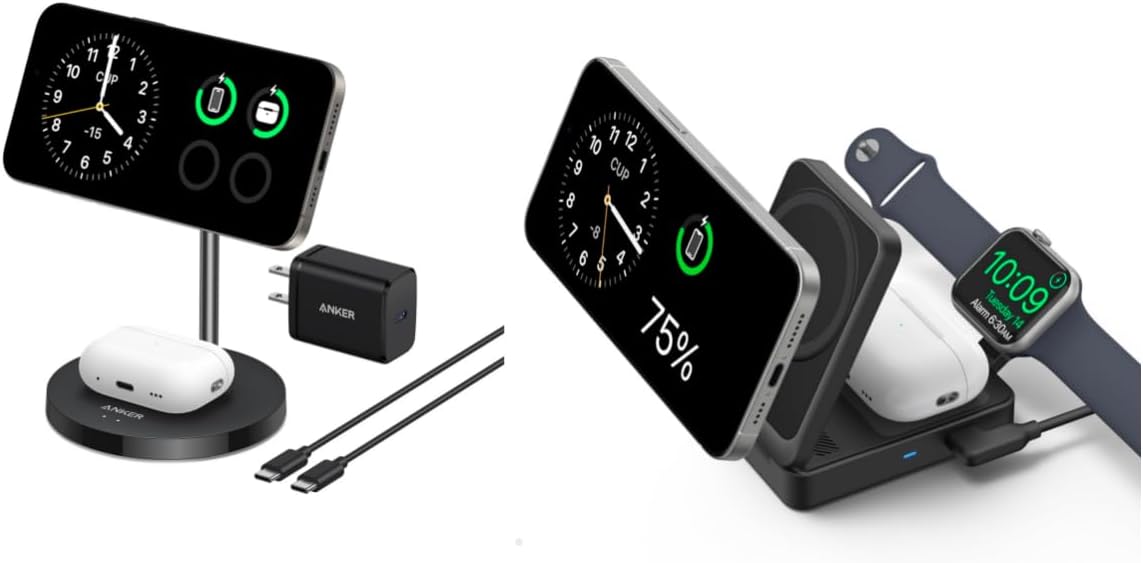
Meet the ultra-compact, foldable 15W wireless charging station that fits in your palm—about the size of a deck of cards and only 6.9 oz. Qi2 certified and MagSafe-compatible, it snaps your iPhone into perfect alignment for efficient 15W charging—think iPhone 15 Pro up to 25% in about 21 minutes. The built-in MFW-certified Apple Watch charger powers Series 9 to around 47% in 30 minutes, so quick pit stops actually count. Charge your phone and earbuds at once to simplify your nightstand or travel kit. Fold it, toss it in your bag, and keep your day flowing—from morning alarms to late-night check-ins—without juggling cables. It’s the little daily upgrade that clears clutter, saves time, and keeps your essentials ready whenever you are.
20. Anker 727 Charging Station (GaNPrime 100W)

Meet the Anker 727 Charging Station—your slim, go-anywhere power hub. At just 0.7 inches thin and about the size of an iPhone 13 Pro Max, it slides into a bag or even a jacket pocket. With 2 USB-C, 2 USB-A, and 2 AC outlets, you can power up to six essentials at once—laptop, phone, tablet, and more. GaNPrime tech delivers up to 100W, so a 16-inch MacBook Pro goes from 0 to 50% in about 43 minutes. ActiveShield 2.0 keeps things safe by monitoring temperature and intelligently adjusting output. The 5 ft detachable cord makes awkward outlets easy to reach, while your desk stays clean and calm. Whether you’re traveling, studying, or creating on the go, 727 helps you stay focused—not tangled. Note: this is not a wireless charger or portable battery.
21. UGREEN Nexode 65W USB-C Charging Station with AC Outlets

Meet the Nexode DigiNest Cube—your all-in-one power hub designed to simplify busy days. With 2 USB-C, 2 USB-A, and 3 AC outlets, it powers your phone, tablet, laptop, and desk essentials at once—so you stay in flow, not in a tangle of cords. The 65W USB-C port delivers fast, reliable charging: think a MacBook Pro 13″ to 36% in 30 minutes, or an iPhone 15 to 58% while an iPad Pro 11″ hits 34%—all at the same time. Built with GaN II technology, it’s compact enough for your nightstand, desk, or carry-on. Intelligent safety chips guard against short circuit, over-voltage, over-heat, and over-current, keeping your devices protected. A handy on/off button cuts down on constant plugging and unplugging. From focused work sessions to weekend getaways, keep your space tidy and your tech ready—effortlessly.
22. Anker Prime 6-in-1 Charging Station (140W)

Meet the Anker Prime 6-in-1 Charging Station (140W)—your desk’s new calm in the cable chaos. With two AC outlets plus 2 USB-C and 2 USB-A ports, it powers up to six devices at once. GaN technology delivers up to 140W, enough to fully charge a 16″ MacBook Pro in about 1 hour 15 minutes. The ultra-slim, 0.7-inch design slips easily into bags, and the pop-up outlet keeps things tidy. A smart display shows real-time power info, while ActiveShield 2.0 runs up to 3 million checks a day to keep devices protected. Traveling? The USB ports support 100–240V for worry-free use worldwide. Includes a 5 ft detachable cord. Plug in, power up, and enjoy a workspace—and travel bag—that finally keeps up with you.
23. CalDigit TS4 Thunderbolt 4 Dock

Meet the powerhouse that simplifies your desk and supercharges your day. With 18 ports, the TS4 connects everything at once—8x 10Gb/s USB, 3x Thunderbolt 4, DisplayPort 1.4, SD and microSD UHS-II, 2.5GbE, and three audio ports—while delivering up to 98W to keep your laptop charged. Create the setup you’ve dreamed of: on Windows, drive a single 8K display or dual 4K 60Hz; on macOS, enjoy up to 6K 60Hz (M1–M3 non‑Pro support a single display; M1/M2/M3 Pro/Max/Ultra and M4 families support dual 6K 60Hz). Transfer media instantly, collaborate faster over 2.5Gb Ethernet, and reclaim your workspace with one tidy cable. Universally compatible with Thunderbolt 4/3, USB4, and USB‑C hosts—including Macs, Windows PCs, Chromebooks, iPad, and iPhone 15–16 Pro—the TS4 adapts to your world and grows with your ambitions. Plug in, breathe out, and focus on what you do best.
24. Satechi 11-in-1 Thunderbolt 4 Dock

Meet the Satechi Thunderbolt 4 Hub—designed to simplify your setup and supercharge your day. Connect up to four external 4K/60Hz displays on supported systems (two via Thunderbolt 4, two via HDMI with DisplayLink drivers; Apple M1/M2 support up to three extended displays). Enjoy blazing transfers with three Thunderbolt 4 ports up to 40Gbps and two USB-A ports up to 10Gbps, plus daisy-chain up to six devices. Power your laptop with 96W USB-C PD, drop footage at UHS-II SD speeds up to 312MB/s, and rely on gigabit Ethernet for steady video calls. It arrives ready with a 1 m TB4 cable and 180W power supply. Compatible with Thunderbolt 4 and USB4 devices across Mac, Windows, ChromeOS, and iPad. Whether you’re editing, coding, or just clearing cable clutter, this hub helps you focus on what matters—creating, connecting, and getting more done.
25. Plugable USB-C Dual 4K Docking Station (DisplayLink)

Meet your desk’s new command center. This 14‑in‑1 USB‑C dock turns a single port into a full workspace: connect two 4K displays at 60 Hz via HDMI or DisplayPort—yes, even on M1/M2/M3/M4 Macs—using DisplayLink (quick driver install). Keep your workflow flowing with front USB‑C and USB‑A for charging, three USB 3.0 ports for peripherals, SD and microSD card readers, a 3.5 mm headset jack, reliable Gigabit Ethernet, and up to 100W host charging. Crafted in premium aluminum with a space gray finish, it looks as good as it performs—ideal for creative pros, coders, and hybrid workers who crave fewer dongles and more focus. Compatible with macOS 11+, Windows 10+, and ChromeOS 100+ systems using Thunderbolt, USB4, or USB‑C. Set it once, and enjoy a clean, powerful, and truly multitasking setup every day.
26. Anker 675 USB-C Docking Station (12-in-1, Monitor Stand)

Meet the 12-in-1 Monitor Stand Dock that turns any desk into a calm command center. A single USB-C cable delivers up to 100W to your laptop while connecting you to 4K HDMI, gigabit Ethernet, two extra USB-C PD ports (shared 45W), three USB-A ports, and SD/microSD card slots—perfect for creators and power users. Drop your phone on the built-in wireless charging pad and keep the momentum going. Beyond speed, it’s about how you feel at work. The ergonomic stand lifts your screen to eye level to ease neck and shoulder strain, and the open space beneath tucks away your keyboard and mouse. Integrated cable management keeps distractions out of sight, so your ideas have room to breathe. Build a cleaner, kinder workspace—one connection at a time.
27. Anker PowerConf C300 Webcam

Step into every meeting with confidence. PowerConf C300 delivers crisp 1080p at a silky 60 FPS with true-to-life color, so faces, gestures, and demos look exactly as you intend. Ultra-sensitive dual microphones pick up your voice clearly, helping your message cut through background noise. Working late or calling across time zones? AI-powered low-light correction keeps you bright and natural in any room. Whether it’s just you or the whole team, smart framing automatically adjusts the field of view to fit everyone in the shot. And with rapid 0.35 s autofocus, you can move, show samples, or hold up notes without missing a beat. Make every conversation feel personal, professional, and effortless—so you can focus on connecting, not fiddling with settings.
28. Loupedeck Live S

Meet your new creative co-pilot. Loupedeck Live S puts your entire workflow at your fingertips so you can focus on what matters—creating. Effortlessly control your stream, chat, audio, mic, and lighting, launch apps and media, and glide between tasks with responsive dials and touch-sensitive buttons with haptic feedback. Set up is easy with native plugins for OBS Studio, Twitch, Spotify, Adobe Premiere Pro, After Effects, Photoshop, Final Cut Pro, and more. Build powerful macros, create multi-step actions, and organize up to 14 pages that adapt as you switch apps—so your tools are always where you need them. Discover even more on Loupedeck Marketplace with 200+ profiles, plugins, icons, and sound packs for everything from Philips Hue and Razer to DaVinci Resolve and Notion. Stay in flow, feel in control, and bring your ideas to life—one tap, twist, and swipe at a time.
29. ODISTAR Desktop Vacuum Cleaner (Mini)
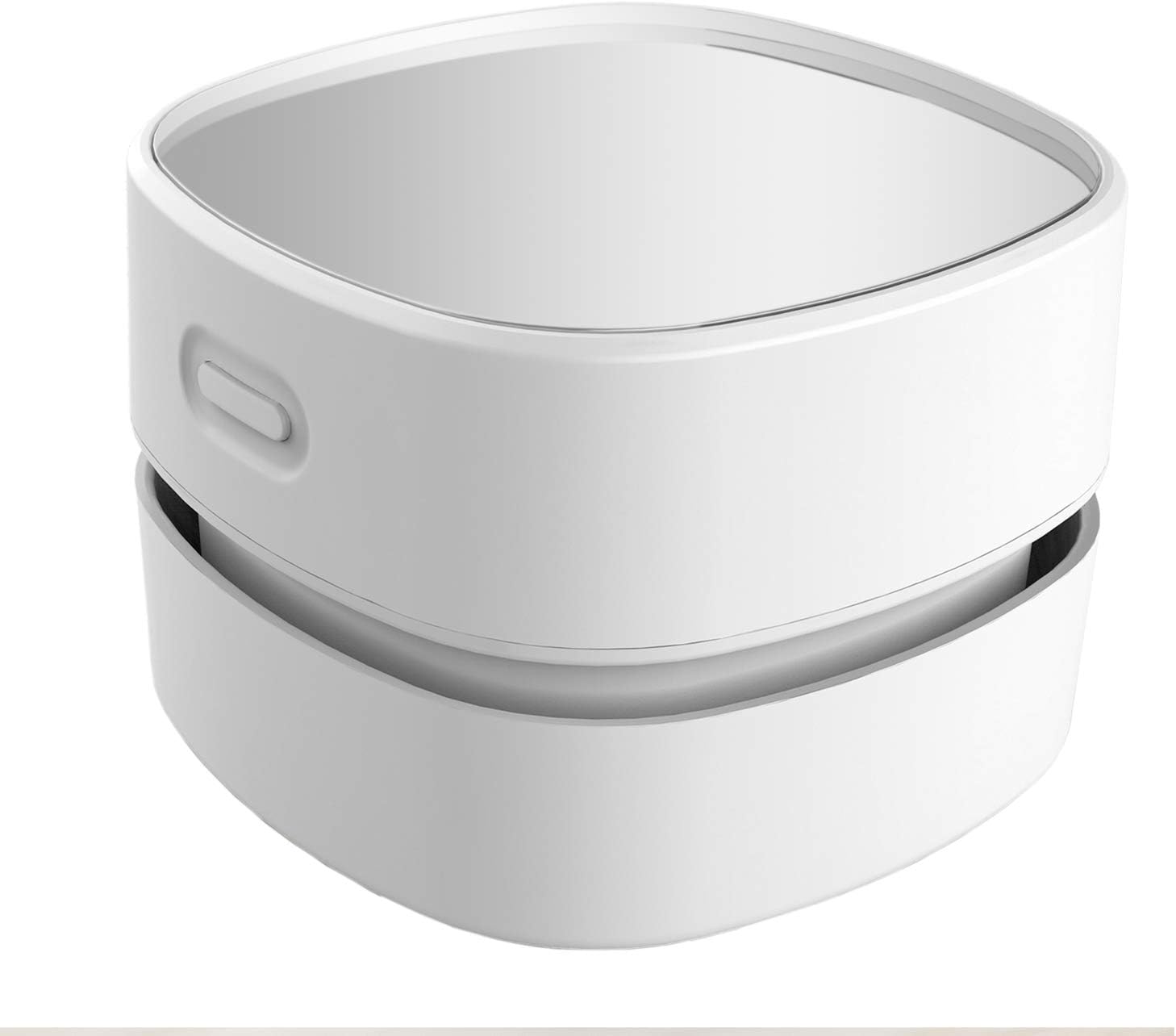
Meet the little helper that keeps your space calm and ready to create. Crumbs, paper shreds, pet hair, and dust disappear in seconds with this handheld mini desk vacuum. Cordless and powered by 2 AA batteries (not included), it runs up to 90 minutes—perfect for grab-and-go tidy-ups between tasks. The 360° rotatable design reaches tight corners and the spaces between hard-to-move items. A precise capture nozzle lifts larger debris with ease on desktops, keyboards, craft tables, and even car consoles. Despite its strong suction, it hums quietly, so you can read, focus, or relax while it works. Simple one-hand operation suits students, busy parents, creatives, and seniors alike. Made from clear, high-quality acrylic, it’s lightweight, durable, and looks great on your desk. Reclaim a clear surface—and a clear mind—whenever life leaves little messes behind.
30. TourBox Lite

Meet TourBox Lite—the compact, wired console that brings calm and control to your creative flow. Built for macOS and Windows (not compatible with iPadOS/Android), it pairs beautifully with tablets, pen displays, and mice so your hand stays in the zone while your eyes stay on the canvas. With 8 thoughtfully placed buttons supporting 50+ actions, up to 30 preset sets, and app-aware profiles, you can map complex shortcuts, macros, plugins, and TourMenu custom menus in minutes. Beginners will love the clean layout and rich templates; pros will appreciate the deep, native integration. From Clip Studio Paint, SAI, and Photoshop to DaVinci Resolve, Final Cut Pro, Premiere, Lightroom, Capture One, After Effects, Blender, ZBrush, and more—TourBox Lite adapts to your workflow. Portable, reliable, and intuitive, it helps you focus on what matters: creating your best work.
Things to consider before buying:
When it comes to creating the perfect desk setup, gadgets can make all the difference. From boosting productivity to enhancing comfort and even adding a touch of style, the right desk accessories transform the way you work or play. But with so many options available, how do you know which ones are worth investing in? This guide will walk you through the key factors to consider before buying desk gadgets so you can make smart choices that fit your needs and budget.
1. Define Your Purpose
Before adding any gadget to your desk, ask yourself: Why do I need it? Is it to improve productivity, reduce clutter, enhance comfort, or simply for aesthetics?
-
Productivity gadgets include tools like smart notepads, desk organizers, and multi-port hubs.
-
Comfort gadgets focus on ergonomics, such as wrist rests, footrests, or monitor stands.
-
Lifestyle and aesthetics gadgets may include ambient lighting, wireless chargers, or fun collectibles.
Knowing your purpose helps you avoid impulse buys and ensures your desk setup truly supports your goals.
2. Space and Size
Desk space is valuable real estate. Some gadgets may look appealing but can quickly overwhelm a small workspace.
-
Compact desks: Choose multifunctional gadgets (e.g., monitor stands with storage, wireless charging pads that double as organizers).
-
Larger desks: You can afford to add bigger accessories like desk lamps, soundbars, or dual-monitor mounts.
Measure your desk area before purchasing to avoid overcrowding and maintain a clean, organized setup.
3. Ergonomics and Comfort
If you spend hours at your desk, comfort is non-negotiable. Ergonomic gadgets can improve posture, reduce strain, and make work more enjoyable.
-
Monitor height: Consider adjustable monitor arms or risers to reduce neck strain.
-
Wrist support: Look for ergonomic keyboards, mouse pads, or wrist rests.
-
Seating comfort: Footrests, lumbar cushions, and desk chairs are worth investing in.
The right ergonomic gadgets not only boost comfort but also improve long-term health.
4. Compatibility and Connectivity
Many desk gadgets rely on your existing devices, so compatibility matters.
-
Tech gadgets: Make sure docking stations, USB hubs, or smart devices are compatible with your laptop, PC, or phone.
-
Charging solutions: Wireless chargers should support your phone model and charging speed.
-
Smart gadgets: Check if they integrate with platforms like Alexa, Google Assistant, or Apple HomeKit.
A gadget that doesn’t connect properly can quickly become useless clutter.
5. Quality and Durability
Desk gadgets often see daily use, so build quality is crucial.
-
Materials: Metal or high-quality plastics are more durable than cheap, lightweight builds.
-
Reputable brands: Stick to trusted manufacturers with good reviews.
-
Warranty: Look for products that offer at least a one-year warranty for peace of mind.
Spending a bit more on durable gadgets often saves money in the long run.
6. Aesthetics and Style
Your desk is a reflection of your personality. Choosing gadgets that align with your preferred style makes your workspace feel inviting.
-
Minimalist setups: Go for sleek, modern gadgets with neutral tones.
-
Creative setups: Add gadgets with colorful lights, unique designs, or customizable features.
-
Professional setups: Stick to clean, polished designs that look sharp in any office.
A cohesive look not only boosts your mood but can also motivate you to keep your desk tidy.
7. Budget and Value
Desk gadgets come in all price ranges—from budget-friendly organizers to premium smart devices.
-
Set a budget: Decide how much you’re willing to spend before shopping.
-
Prioritize essentials: Invest in gadgets that directly improve productivity and comfort.
-
Avoid gimmicks: Not every flashy gadget adds value; make sure it serves a real purpose.
Remember: the most expensive gadget isn’t always the best. Focus on value for money.
8. Reviews and Recommendations
Before hitting the buy button, always check reviews and comparisons. Real-world user experiences often reveal strengths and weaknesses that product descriptions don’t mention. Reading or watching reviews can save you from buying something that looks great on paper but performs poorly in practice.
Final Thoughts
The best desk gadgets are the ones that improve your workflow, comfort, and environment without creating clutter. Start by identifying your needs, then consider space, ergonomics, compatibility, quality, style, and budget. With thoughtful choices, your desk can become a space that not only looks impressive but also helps you stay productive and inspired every day.
Leave a Reply