
If you want to stop your screen from flickering and lagging, you need to get the right 4K HDMI cables. You deserve an amazing, crystal-clear Ultra HD picture that makes your favorite movies come to life. Don’t allow a cheap, weak wire to mar your amazing movie nights or your fast-paced gaming wins. Let’s have a look at the best options for your home setting.
Top 12 4K HDMI Cables:
1. Amazon Basics HDMI Cable—Best 4K HDMI Cable Overall

I keep going back to this solid workhorse after testing dozens of cables. It just works, giving you 4K at 60 Hz with 18 Gbps bandwidth all the time, with no problems or issues. The quality of the build is good without being too complicated. Works with everything from laptops to PS5s to Roku. The great value-to-performance ratio and Amazon’s easy return policy are what make it number one. The simplicity is great; there are no extra features that drive up the price. Great for 99% of people that seek stable 4K performance. If you don’t need HDMI 2.1 features like 120 Hz gaming or 8K, just go on and choose one of the more advanced options further on our list.
2. UGREEN HDMI elbow—Best 90-Degree 4K HDMI Cable

This smart solution rescued my TV setup on the wall. The 90-degree angle keeps the wire from jutting straight out, which would leave gaps between the TV and the wall. It has a bandwidth of 18 Gbps and supports 4K at 60 Hz. The right-angle construction also makes the cables less likely to break. The nickel-plated aluminum casing looks nice and lets heat escape easily. Triple shielding keeps the signal steady, even in small spaces. Great for TVs that are installed on walls, small entertainment centers, or any other place where space is limited. If you need HDMI 2.1 features or have a lot of space, these connections aren’t the best choice. Standard straight cables are usually more flexible and less expensive for open setups.
3. Belkin Ultra HD HDMI 2.1 Cable—Best Gaming 4K HDMI Cable

As soon as I hooked this into my gaming setup, I realized why gamers love Belkin. This beast is HDMI 2.1 approved and can send 48 Gbps for seamless 4K gaming at 120 Hz. The VRR (Variable Refresh Rate) got rid of any screen tearing, and the ALLM (Auto Low Latency Mode) turns on by itself. Support for Dolby Vision makes single-player adventures look amazing. The cable feels like it can’t be broken because it is made of high-quality materials. Great for hardcore console players who want to get the most out of their PS5 and Xbox Series X. If you mostly stream movies or play older games, you can skip this. The gaming-specific features would be useless for non-interactive content or games that only run at 60 frames per second.
4. BlueRigger Micro HDMI Cable—Best Micro 4K HDMI Cable
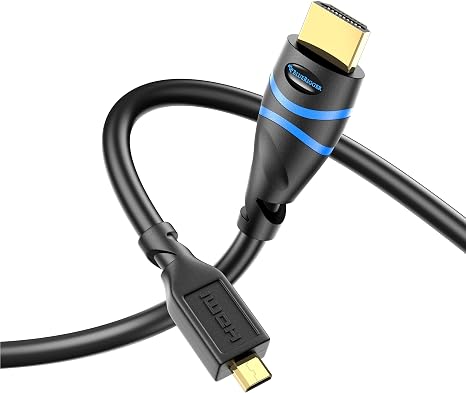
When I tried this out with my GoPro and Raspberry Pi projects, it taught me a lot. Most cables break at the Micro HDMI connector, but BlueRigger’s entire metal jacket construction keeps them safe. It has a bandwidth of 18 Gbps and can support 4K at 60 Hz, which is necessary for reviewing action camera footage. The capacity to send and receive data in both directions implies less cable confusion. What I enjoy is how long it lasts. It has been jammed in camera bags many times and still works. Great for people that make content, fly drones, or are tech-savvy and use Micro HDMI devices. If all of your gear uses normal HDMI, this particular connector won’t do you any good. Check the port on your device first!
5. Highwings 4K 60 Hz HDMI Cable—Best Budget 4K HDMI Cable

This saved me money when I needed cheap wires that worked. Don’t be fooled by the price; this can handle 4K at 60 Hz all the time with 18 Gbps HDMI 2.0 bandwidth. The double military-grade shielding keeps the signal clear even when I’m near my cable mess. At this price, I didn’t anticipate the 24K gold-plated connectors to be as resistant to corrosion as they are. This is great for students, people who stream on a budget, or anyone who wants to upgrade from 1080p without going insane. If you need 120 Hz support or want to make sure your TV will work with 8K in the future, don’t buy this. It doesn’t include HDMI 2.1 features. But what about simple 4K streaming? It hits the nail on the head.
6. PowerBear 4K HDMI Cable—Best Value for Money

This is where performance and value come together, people. I got a two-pack thinking they would be cheap, but PowerBear shocked me. The nylon braiding held up through my messy reorganizations of my entertainment center, and the gold-plated connectors really do keep the signal clear. With 18 Gbps bandwidth and ARC compatibility for soundbars, it can handle 4K at 60 Hz without any problems. The CL3 rating signifies that it can be safely put in the wall. This is great for anyone who needs reliable 4K connections but doesn’t want to pay a lot for them, like streaming fans, casual gamers, and home theater newbies. If you need HDMI 2.1 features like 120 Hz gaming or 8K support, this isn’t for you. Then stick with the best selections.
7. Silkland Certified HDMI 2.1 Cable – Best for Ultra High Speed

I noticed the unique “E-Braid” structure right away. It’s stronger than regular braided cables. This approved cable really does give 48 Gbps performance. It can handle 4K at 240 Hz for competitive gaming without any compression. The HDR10+ and Dolby Vision support make my movie nights a lot more real. The combination between high-end features and low prices is what makes it stand out. Great for gamers who desire ultra-high refresh rates and videophiles who want HDR to be perfect. If you have basic 60Hz displays or mostly view standard video, don’t bother. You’ll pay for performance that your system can’t use anyway.
8. Highwings Gbps Certified HDMI Cable—Best for 4K at 120 Hz

It was very interesting to test this with my OLED TV. The 48 Gbps certified bandwidth easily handles 4K at 120 Hz, and the HDR10+ made my favorite movies appear amazing. I inadvertently moved my chair over the braided cord a few times, and it didn’t break. It feels like it can’t be broken. The HDCP 2.3 support for the newest streaming material is what I really like. This is great for playing PS5 and Xbox Series X games for people who like to play on consoles and watch movies at home. If you still have an older console or a 1080p TV, though, the advanced capabilities won’t be used; therefore, it’s a waste of money.
9. Zeskit Certified 2.1 8K HDMI Cable—Best Premium HDMI Cable

I paid extra for this high-end choice because I wanted quality, but Zeskit went above and beyond. The hologram sticker that says “official HDMI 2.1 certification” provides you peace of mind that the specs are real. It runs 8K at 60 Hz and 4K at 120 Hz perfectly, and the cable management is great because the design is both flexible and strong. The VRR and ALLM features make my Xbox Series X games run much more smoothly. Great for fans who want to know their performance will be good and don’t mind spending more. If you’re on a tight budget or only have basic gear, you should skip this. The performance improvements won’t be worth the extra money.
10. JSAUX 8K HDMI Cable—Best for 4K at 144 Hz

This braided beauty has been great for my PC gaming rig. The gold-plated connectors aren’t just for looks; they keep the signal clear even after hundreds of plug-ins. With the important 48 Gbps bandwidth, it can handle 8K at 60 Hz and 4K at 144 Hz. The nylon braiding keeps it from becoming tangled, which is great for me behind my desk. Great for PC gamers who need 144 Hz support but don’t want to spend a lot of money. If you’re just on a console and can’t go over 120 Hz, though, you’re paying for headroom that you won’t be able to use. It also feels a little stiff at first; it has to be broken in.
11. Adauxter Certified 10K HDMI 2.1 Cable—Best for 4K 240 Hz

This cable is like future-proofing on steroids. The 4K at 240 Hz worked perfectly with my high-refresh gaming monitor. There was no tearing or stuttering. The 48 Gbps bandwidth handles 10K and 8K at 60 Hz with ease, as well as all the other HDMI 2.1 features like VRR and QFT. The build quality for the price really shocked me. The triple shielding keeps interference away. People who play games competitively and those who get things early will adore this. But really, if you don’t like playing games at very high refresh rates or watching 8K video, this is too much for most 4K streaming demands.
12. UGREEN 8K HDMI 2.1 Cable—Best for Apple TV, PS5 & Xbox

I didn’t think the difference would be this big when I plugged this thing up to my PS5. This gadget has full HDMI 2.1 certification and can handle 8K at 60 Hz to 4K at 240 Hz. It can also handle 48 Gbps of bandwidth. The metal case blew my mind. It feels high-end and keeps cool even while I’m playing for hours. My Dolby Atmos soundbar finally sounded good thanks to the Dynamic HDR and eARC support. Great for gamers and home theater fans who have next-gen consoles. If you’re still using basic 1080p sets, don’t bother. You’d be paying for stuff you can’t utilize yet.
Things to consider before buying:
Most 4K HDMI cables promise high-definition clarity and reliable connectivity for your devices. This guide reviews the top options, ensuring you make an informed choice for streaming, gaming, and home theater setups. Discover which cables stand out for quality and performance, enhancing your viewing experience.
High Speed vs. Premium High Speed Standards
High Speed HDMI cables support 1080p video, while Premium High Speed cables enhance performance for 4K video at 60 Hz. The latter ensures a more reliable signal transmission, crucial for high-definition content.
Ultra High Speed Cables for Hz Performance
Ultra High Speed HDMI cables are specifically designed to handle 8K video at 60 Hz and 4K video at 120 Hz, making them ideal for high-performance setups.
Utilizing ultra-high-speed cables ensures optimal performance for gaming and high-resolution video playback. These cables are necessary for next-generation gaming consoles and high-fidelity displays, allowing you to experience stunning visuals without lag or lower refresh rates.
Critical Factors for Optimal Signal Transfer
Understanding key elements helps ensure the best video and audio quality. Consider the following factors:
- Bandwidth requirements
- HDR metadata compatibility
- Cable length
- Construction quality
You must assess these aspects to maximize your 4K experience.
Bandwidth capacity and HDR metadata support
Bandwidth capacity is integral for transmitting 4K video at high refresh rates. Ensure your HDMI cable supports at least 18 Gbps, which permits HDR metadata, enhancing color depth and contrast. Proper support for these features significantly enriches your viewing experience.
Cable length limitations and signal degradation risks
Cable length can impact signal quality, leading to degradation. Shorter cables generally maintain optimal performance, while longer cables may require additional signal boosters or high-quality materials to reduce interference.
Long HDMI cables exceeding 25 feet often experience signal loss, diluting both audio and video quality. Using an active HDMI cable or an HDMI over Ethernet solution could mitigate this issue, allowing you to maintain high-quality performance even over extended distances. Always choose quality construction to minimize risks associated with longer lengths.
Benefits of fiber optic vs. traditional copper cores
Fiber optic cables offer superior speed and bandwidth, allowing for high-resolution data transfer without degradation. These cables are also immune to electromagnetic interference, ensuring a clearer signal over longer distances compared to traditional copper cables.
Durability of braided jackets and gold-plated connectors
Using braided jackets enhances resistance to wear and tear, ensuring longevity in various environments. Gold-plated connectors prevent corrosion, providing stable connections over time, which is particularly beneficial for high-performance audio and video setups.
Braided jackets provide not only increased flexibility but also a defense against tangles and damage. Gold-plated connectors maintain optimal conductivity and prevent oxidization, making them ideal for environments subject to moisture or varying temperatures. By investing in these materials, you enhance the overall performance and lifespan of your HDMI cables.
Identifying and aligning directional active cables
Directional active cables have defined input and output ends. Ensure you connect the cable from the source device to the display correctly for optimal performance. Always check the labels or arrows on the cable to confirm alignment.
Securing connections for consistent 4K handshaking
Connections must be tight to ensure consistent communication between devices. Loose cables can lead to signal drops or failure of the 4K handshake process.
Ensure each connection clicks firmly into place. Additionally, avoid placing excessive strain on the cables during installation. Making sure that the HDMI connectors are securely fastened prevents any disconnections during use, leading to improved video quality and minimizing interruptions.
Expert Tips for Maximizing Video Fidelity
- Choose high-quality cables
- Optimize cable length
- Reduce electromagnetic interference
- Verify HDCP 2.2 compatibility
Any adjustments you make can significantly enhance video quality.
Reducing Electromagnetic Interference Through Smart Routing
Avoid placing HDMI cables near power sources to minimize electromagnetic interference. Routing cables away from electrical appliances can help maintain an uninterrupted signal. Organizing cables neatly with proper ties can further reduce interference, contributing to clearer video output.
Verifying HDCP 2.2 Compatibility Across All Devices
Ensure all devices, including your TV, Blu-ray player, and streaming hardware, support HDCP 2.2. This protocol prevents content from being copied illegally and is necessary for accessing 4K content. Without HDCP 2.2 compatibility, you may face playback issues and resolutions lower than intended.
Verifying HDCP 2.2 compatibility is straightforward. Check device specifications and settings, and look for HDCP compliance labels. If even one component in your setup lacks the required support, it could limit your viewing experience or block 4K content altogether. Always confirm compatibility before finalizing your system configuration.
To wrap up
From above, you can see that selecting the best 4K HDMI cables enhances your viewing experience significantly. Quality cables not only support high resolutions but also ensure minimal signal loss. Investing in reliable options will guarantee better performance and longevity, allowing you to fully enjoy your 4K devices without interruption.
Leave a Reply