
Finding the best PS5 gaming headsets shouldn’t feel like a boss fight you can’t win. You deserve crystal-clear spatial audio to hear every footstep and gain a massive edge over your rivals. Stop settling for muddy sound that ruins your immersion and hurts your ears. We’ve tested the top options for comfort and wireless connectivity to save you time. Here are our favorite picks to transform your gaming experience today.
9 Best PS5 Gaming Headsets:
1. SteelSeries Arctis Nova 5P — Best PS5 Gaming Headset Overall

Here’s the thing about the Arctis Nova 5P: it doesn’t make you choose. Great sound, long battery life, easy switching between devices. You get all three.
The custom neodymium drivers are tuned for clear highs, sharp mids, and deep bass. In practice, that means you hear the footsteps creeping up behind you and still feel the explosion that follows. If you’d rather not spend an evening fiddling with EQ sliders, the Arctis Nova 5 Companion App gives you over 100 presets built for popular games. Pick one and play.
Battery life is where it really pulls ahead. It’s rated at up to 60 hours, which works out to about eight hours a day for a full week. Forget to charge it? Fifteen minutes over USB-C gets you roughly 6 hours back.
The ClearCast Gen 2.X mic retracts fully, so it’s out of sight when you’re playing solo and ready when your squad needs you. It’s also a noticeable step up in voice clarity.
One small catch: you switch between 2.4GHz and Bluetooth rather than running both at once, though a notification beep tells you when a call comes in. The compact USB-C dongle moves easily between PS5, PC, Switch, and your phone or tablet.
2. Logitech G Astro A50 — Best Premium PS5 Gaming Headset
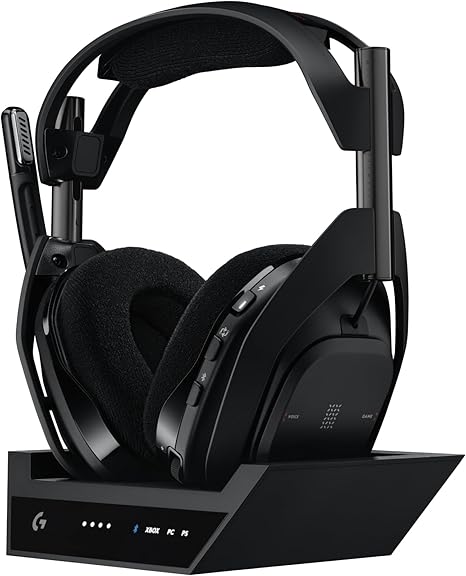
If you own more than one console, you already know the cable shuffle. Unplug, crawl behind the TV, plug back in, repeat. The Logitech G Astro A50 X pretty much ends that routine.
Its PLAYSYNC button lets you jump between three platforms right from the headset. And because the base station has HDMI 2.1 passthrough, your picture switches along with your sound, at up to 4K 120Hz. PS5, Xbox, and PC can finally share one screen without a fight.
The PRO-G GRAPHENE drivers are built for clarity and quick response. You’ll hear it in the snap of gunfire, and in quieter moments too, like a single footstep that gives away someone’s position. LIGHTSPEED wireless keeps everything responsive, and dual-device mixing lets a call or playlist run over Bluetooth while you play.
The 48kHz boom mic delivers broadcast-quality voice and mutes when you flip it up. A game and chat balance control lets you decide who’s louder, your teammates or the game.
Battery life is rated at up to 24 hours, lower than a lot of headsets on this list. The upside is that the base station doubles as a magnetic charging cradle. Set it down after each session and you’ll rarely think about it.
3. Razer BlackShark V3 Pro — Best Noise-Cancelling PS5 Gaming Headset

Most of us don’t game in a quiet room. There’s a fan running, a TV on in the next room, maybe traffic outside. The Hybrid Active Noise Cancellation on the Razer BlackShark V3 Pro turns a lot of that down so you can actually focus.
HyperSpeed Wireless Gen-2 handles the connection with ultra-low latency, keeping sound in sync with what’s on screen. In a close round, that timing can decide who wins.
Inside are TriForce Bio-Cellulose 50mm Drivers Gen-2, tuned for precision and punch. You get clean directional cues without losing the weight of a big firefight. The ultra-soft memory foam cushions seal nicely around your ears, which helps with comfort and keeps more outside noise out.
The HyperClear Full Band mic captures your voice in detail and cuts down background noise. It’s detachable too, so it comes off when you just want to watch something.
You can run 2.4GHz and Bluetooth at the same time, which makes taking a call mid-match easy, and there’s a 3.5mm jack for wired use. It works with PS5, PC, Mac, Switch, and phones, with up to 70 hours of battery. Keep in mind that THX Spatial Audio is a PC feature. On PS5, you’ll use the console’s own 3D audio instead.
4. SteelSeries Arctis Nova Pro — Best Wired PS5 Gaming Headset

‘
Wireless is convenient, sure. But if sound quality matters most to you, wired still makes a lot of sense, and the Arctis Nova Pro shows why.
A big part of it is the GameDAC Gen 2. It’s a dedicated amp with an ESS Sabre Quad-DAC inside, and its job is to clean up the audio signal before it reaches your ears. You get Hi-Res Audio at up to 96kHz/24-bit. In plain terms, soundtracks feel wide, explosions stay tight instead of turning to mush, and small sounds like a distant reload actually come through.
The Premium Hi-Fi drivers and 360-degree spatial audio make it easier to tell where sounds are coming from, and it works with Tempest 3D Audio on PS5. You can adjust the 10-band EQ right on the GameDAC without pausing, and the ComfortMAX system keeps long sessions comfortable.
The ClearCast Gen 2 mic uses AI noise cancellation and slides back into the earcup when you’re done talking.
Got a PS5 and a PC on the same desk? Plug both into the GameDAC and switch with a button. The downsides are what you’d expect: there’s a cable, and the full Sonar parametric EQ needs a PC.
5. SteelSeries Arctis Nova 7P Wireless — Best Mid-Range PS5 Gaming Headset

Taking a phone call mid-match is usually awkward. You pause, or you end up squeezing an earbud under your headset. The Arctis Nova 7P fixes that by running 2.4GHz and Bluetooth at the same time, so you hear lag-free game audio with your phone, Discord, or a podcast on top.
It sounds minor. Once you’re used to it, it really isn’t.
The audio comes from SteelSeries’ Nova Acoustic System, which pairs custom high-fidelity drivers with 360-degree spatial audio. You get a good sense of where footsteps and shots are coming from, and it’s fully compatible with Tempest 3D Audio on PS5. If you play on PC as well, Sonar software adds a 10-band parametric EQ with presets made with esports players.
The retractable ClearCast Gen 2 mic uses AI noise cancellation, so your squad hears you and not everything going on around you.
Battery is rated at up to 38 hours, and 15 minutes of charging adds about 6 more. That’s less than the Nova 5P, so you’ll plug in a bit more often. The small USB-C dongle works across PlayStation, PC, Mac, and Switch, and the magnetic ear plates come off if you want to change the look.
6. Turtle Beach Atlas Air Wireless — Best Open-Back PS5 Gaming Headset

A couple of hours into a long session, most closed-back headsets start to feel like warm earmuffs. The Turtle Beach Atlas Air goes open-back instead, so air moves freely and the sound has room to breathe. It feels more natural, like the game is happening around you instead of inside your head. And you’ll still hear the doorbell.
Comfort is the real draw here. The floating earcups adjust in three dimensions to sit properly around your ears, and the floating mesh headband keeps weight down. The memory foam cushions are glasses-friendly and wrapped in athletic weave fabric, so you stay cooler for longer.
The 40mm drivers are tuned for the open design. The mic is removable and flips up to mute, and the Swarm II app lets you adjust the noise gate, sensitivity, and presets.
On PS5, you connect over low-latency 2.4GHz wireless. There’s Bluetooth 5.2 for your phone and a 3.5mm port for wired use. Battery life is up to 50 hours, with quick charge.
Two things to know first. The 24-bit high-fidelity mode and high-bandwidth mic are PC-only. And since it’s open-back, anyone sitting nearby will hear your game too.
7. Ozeino 2.4GHz Wireless Gaming Headset — Best Value PS5 Gaming Headset

Going wireless doesn’t have to mean buying a flagship headset. The Ozeino 2.4GHz Wireless Gaming Headset keeps things simple and still gets the important stuff right.
Latency sits under 30ms, so what you hear lines up with what you see. No awkward gap between hearing footsteps and seeing someone turn the corner. The transmitter has both USB-A and USB-C connectors, so it plugs straight into your PS5, PC, laptop, or Switch without an adapter.
Sound comes through a 50mm driver with lossless 2.4GHz transmission. Expect solid bass and enough detail to pick out footsteps, reloads, and voice lines in shooters and RPGs alike.
The flip mic drops down when you want to talk and stays out of the way when you don’t. Buttons on the headset handle volume and mute, so there’s no need to pause the game to change anything.
Battery life goes up to 40 hours, and you can keep playing while it charges. Bluetooth pairs with your phone or laptop for casual listening, but it won’t connect directly to a PS5 or PS4. For console gaming, stick with the 2.4GHz dongle. If you just want a dependable wireless headset for your console, this one makes a lot of sense.
8. NUBWO Wireless Gaming Headset — Best Budget PS5 Gaming Headset
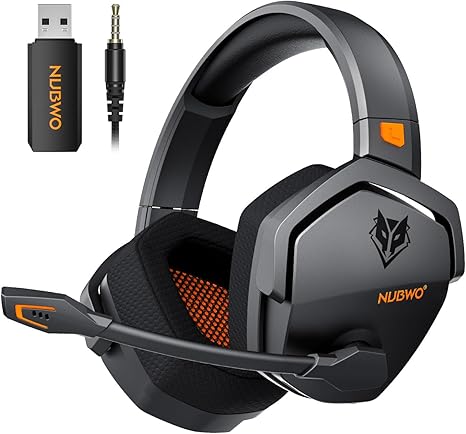
Nobody likes charging a headset, and with the NUBWO G06 you won’t have to do it often. A 1200mAh battery and a low-power chipset give you up to 100 hours of playtime. That’s weeks of evening gaming before you need the cable, and a full recharge takes about four hours.
On PS5, PS4, or PC, you plug in the 2.4GHz dongle and get a steady connection with 23ms latency, so the audio keeps pace with the action. It’s also designed to work next to your wireless keyboard, mouse, controller, and Wi-Fi without interference.
Bluetooth 5.3 can connect to your phone at the same time, so you can take a call or keep music going without leaving your game. Prefer a cable? There’s a standard 3.5mm connection too.
The 50mm drivers give you full, immersive stereo sound, good for tracking footsteps or enjoying a big open-world soundtrack. Cushioned ear cups and an adjustable headband keep it comfortable over long stretches. For a headset that covers the basics and then outlasts nearly everything on battery, it’s hard to argue with.
Quick heads-up: in Bluetooth mode, the mic may not work the same on every device, and mute can behave differently when you’re wired.
9. Turtle Beach Stealth 600 (Gen 3) — Best Affordable Wireless PS5 Gaming Headset

There’s a reason the Stealth 600 has spent so long near the top of the wireless console headset charts, and the third generation builds on it.
Start with the battery, because it’s impressive. You get up to 80 hours on a single charge, plus quick charge for the rare time it runs out. You might genuinely forget where you put the cable.
The 50mm Nanoclear drivers are tuned for precise, detailed sound and optimized for spatial audio on PlayStation and PC, so it’s easier to tell where the action is coming from. The mic got a redesign too. It’s uni-directional, flips up to mute, and uses AI noise reduction to keep background noise out of your chat. Your teammates will thank you the next time your dog starts barking.
The QuickSwitch button moves you between low-latency 2.4GHz wireless and Bluetooth 5.2 with one press. The Swarm II app for PC, iOS, and Android gives you a 10-band EQ, audio and mic presets, and controls for the mappable wheel and mode button. Memory foam, glasses-friendly cushions help on long nights.
Just make sure you’re a PlayStation player. This version doesn’t work with Xbox, and some advanced audio features are limited over Bluetooth.
Things to consider before buying:
You want the best audio experience for your PS5 gaming sessions. This guide highlights the top nine headsets that deliver excellent sound quality, comfort, and features tailored for immersive gameplay. Explore these options to enhance your gaming experience and choose the right headset for your needs.
Key Factors for Selecting High-Fidelity Audio
Choosing the right gaming headset involves several vital factors that impact overall audio quality.
- Sound clarity
- Frequency response
- Comfort during long sessions
- Durability and build quality
- Wireless vs. wired options
The right combination of these elements ensures an immersive gaming experience.
Driver Quality and Soundstage Width
Driver quality significantly enhances sound reproduction and impacts immersion. Great headphones employ larger drivers, delivering richer, more detailed audio. A wide soundstage further allows you to pinpoint in-game sounds, vital for competitive play.
Microphone Clarity and Noise Isolation
Microphone clarity plays a key role in communication with teammates. Choosing a headset featuring noise-isolating technology eliminates background distractions, ensuring your voice is transmitted clearly.
Of particular importance, a high-quality microphone can make or break your gaming experience. Clarity allows for effective team communication during intense moments, while noise isolation prevents unwanted sounds from disrupting gameplay. Investing in a headset with advanced microphone features will enhance collaboration and strategy execution in multiplayer environments.
Common Types of PS5 Compatible Headsets
- Wireless Headsets
- Wired Headsets
- Noise-Cancelling Headsets
- Surround Sound Headsets
- In-ear Monitors
The range of PS5 compatible headsets includes various types catering to gamers’ needs and preferences.
Dedicated Wireless vs. Traditional Wired
Dedicated wireless headsets offer freedom of movement, using advanced protocols for minimal latency. Wired counterparts provide a straightforward, reliable connection without worrying about battery life.
Closed-Back vs. Open-Back Acoustics
Closed-back headsets create an enclosed sound stage, providing better noise isolation. Open-back designs produce a more natural, open sound, allowing for environmental awareness. Closed-back headsets excel in blocking external noise, making them ideal for immersive gaming sessions. Conversely, open-back options allow ambient sounds in, fostering a more natural listening experience. Your choice depends on whether you prioritize isolation or an expansive audio environment.
Reviewing the 9 Best PS5 Gaming Headsets
This review highlights nine exceptional PS5 gaming headsets, covering various needs from immersive sound to comfort. Each model has unique features, ensuring you find the perfect fit for your gaming experience.
Connecting Your Headset to the PS5
Choose your headset type-wired or wireless. For wired headsets, plug them into the controller’s audio jack. For wireless, pair the headset via Bluetooth by following on-screen prompts in the settings.
Optimizing 3D Audio Settings for Immersion
Activating 3D audio transforms your gaming experience. Navigate to the sound settings and toggle on 3D Audio to surround yourself with immersive soundscapes.
Adjusting specific 3D audio settings can enhance your experience further. Experiment with the equalizer options and additional adjustments, allowing you to fine-tune sound placement based on your gaming preferences. This personal customization ensures a deeper level of engagement during gameplay, making you feel as though you are truly inside the action.
Advantages of Low-Latency Wireless
Low-latency wireless technology minimizes audio delay, allowing for real-time interactions. This feature enhances your gaming experience, particularly in competitive environments where timing is critical. The freedom of movement without tangled cables adds to comfort and immersion.
Limitations of Battery Life and Weight
Battery life in wireless headsets often limits extended gaming sessions. Many models are relatively heavy, which can lead to discomfort during prolonged use. Choosing a balance between sound quality and comfort is important.
Battery performance varies across models, impacting how long you can enjoy gaming before needing a recharge. Heavier headsets might cause fatigue during long periods of wear, detracting from your overall experience. Prioritize finding a headset that offers both good battery life and lightweight design to ensure comfort and satisfaction while gaming.
Expert Tips for Enhancing Your Experience
- Adjust audio settings for optimal sound.
- Utilize noise-canceling features for immersion.
- Experiment with comfort options like ear pads.
The right adjustments can significantly enhance your gaming audio.
Customizing Equalizer Settings
Tailor your equalizer settings to match your gaming preferences. Different game genres may require unique audio adjustments, boosting bass for action or clarity for dialogue. Explore preset options or create your own for a personalized audio experience.
Maintenance for Longevity
Taking care of your headset will extend its lifespan. Regularly clean the ear pads and avoid exposure to extreme temperatures. Storing the headset in a protective case also helps preserve its quality.
Proper maintenance involves checking connections and cables for wear and tear. Keep the headset clean by using a soft cloth to remove sweat or dust. Avoid pulling on cables when unplugging to prevent damage. Regularly inspect for any unusual sounds, which could indicate a need for repair. By being proactive, you’ll ensure your headset remains in great condition for countless gaming sessions.
Conclusion
Presently, selecting the right PS5 gaming headset enhances your gaming experience significantly. The 9 best headsets listed offer a range of features suited for various preferences and budgets, ensuring you find an option that meets your needs for sound quality, comfort, and functionality.
Leave a Reply