
Picking a graphics card in 2026 feels less like shopping and more like decoding a spec sheet written in alien runes. CUDA cores, ray tracing units, DLSS 4, FSR, XeSS, 12VHPWR connectors — at some point you just want to know which card is actually going to push the games you play at the resolution you play them, without lighting your wallet on fire. That’s what this list is for. Some of these cards chase 4K ray-traced glory; others just want to quietly handle 1080p and stay out of your way. The lineup below covers both ends and most of the middle.
Top 12 Graphic Cards:
1. ASUS ROG Astral GeForce RTX 5090 White OC Edition — Overall Best Graphic Card

If money were no object and shelf appeal mattered, this is the card you’d shortlist before anyone even mentioned framerates. The Astral is ROG’s first quad-fan design, and ASUS leans into the engineering hard — a patented vapor chamber, denser heatsink fin spacing, and a phase-change GPU thermal pad that fills micro-gaps as it heats up. You’re looking at 32GB of GDDR7 across a 512-bit memory interface, PCIe 5.0, DLSS 4 support, and a 3.8-slot frame finished in clean white with indirect Aura ARGB lighting tucked behind the shroud. Outputs include three DisplayPort 2.1b and two HDMI 2.1b, so you can drive up to four displays simultaneously. ASUS even throws in a matching white GPU holder, which is a nice touch since this thing has the heft to deserve one. MaxContact expands heat spreader contact area by 5%, knocking down GPU temps by up to 2°C — small number, real difference under sustained 4K loads. The honest caveat: this card eats space. The 3.8-slot width and roughly 14-inch length will make small cases laugh. Plan your build around the Astral, not the other way around.
2. GIGABYTE Radeon RX 7600 XT Gaming OC — Best 1080p Value AMD Graphic Card

Coming from team red and aiming squarely at 1080p, the RX 7600 XT Gaming OC is GIGABYTE’s take on AMD’s RDNA 3-based mainstream chip. You get 16GB of GDDR6 running at 18000 MHz on a 128-bit memory bus, a 2810 MHz core clock straight out of the box, and PCI-E 4.0 connectivity. That extra VRAM matters more than people give it credit for — modern textures don’t shrink, and 16GB is actually useful if you like to crank settings rather than chase max framerates. The WINDFORCE triple-fan cooler keeps things calm even when the card is pushed, and the RGB Fusion logo on top means you can color-match it with the rest of your build if that’s your thing. Display outputs cover two HDMI 2.1a and two DisplayPorts, which is more headroom than most 1080p setups will ever need. One caveat worth mentioning: this is a 1080p-class card with 1440p ambitions, not a 4K hero. Push it past its lane and you’ll feel the limits quickly. But for an AMD-flavored mainstream pick where value matters, the 7600 XT Gaming OC earns its spot.
3. ASUS Prime GeForce RTX™ 5080 OC Edition — Best High-End 4K Gaming Graphic Card

This is where 4K gaming gets serious without crossing into flagship-tier silliness. The Prime RTX 5080 OC packs 16GB of GDDR7, PCIe 5.0 support, and a triple Axial-tech fan setup mounted on a 2.5-slot frame — the slim footprint is deliberate, since ASUS designed this one as SFF-Ready for builders trying to cram performance into smaller chassis. The shroud, heatsink, and heat pipe layout are arranged to pull air from the side panel, which is a clever touch if you’ve ever fought a stuffy mid-tower. A phase-change GPU thermal pad sits between the chip and cooler, melting under load to fill any imperfect contact points and improve heat transfer. You also get vapor chamber cooling and a dual BIOS switch — flip it for performance mode when you want max thermals, or quiet mode for a less aggressive fan curve during chill sessions. Outputs are the modern Blackwell standard: HDMI 2.1 and DisplayPort 2.1 spread across the rear. The catch? Despite the SFF-Ready badge, 2.5 slots is still 2.5 slots — if you’re squeezing this into a tiny case, double-check clearances before clicking buy. Otherwise, the 5080 hits the sweet spot for high-refresh 4K gaming without paying the 5090 tax.
4. ASUS Dual GeForce RTX™ 5060 — Best Entry-Level Blackwell Graphic Card
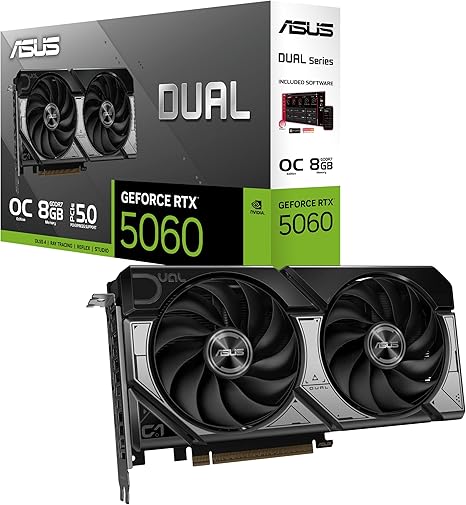
For anyone wanting in on the Blackwell architecture without overspending, the ASUS Dual RTX 5060 OC is the sensible doorway. You’re getting PCIe 5.0, 8GB of GDDR7, DLSS 4 support, and the full set of modern Blackwell features in a compact 2.5-slot package. The dual Axial-tech fan setup uses 0dB technology — fans stop entirely below 50°C and only kick on above 55°C, meaning desktop browsing and light gaming stay silent. There’s also a vented backplate, dual-ball fan bearings rated for longer life than sleeve bearings, and a Dual BIOS switch so you can pick between performance and quiet operation. Outputs are HDMI 2.1b and DisplayPort 2.1b, matching what you’d expect from a modern Blackwell card. The card has the black-and-white shroud design ASUS is using across the Dual line, which somehow looks more grown-up than the RGB-everything aesthetic many builds lean on. Honest caveat: 8GB of VRAM is fine for 1080p but starts feeling tight at 1440p ultra in newer titles. Know the lane you’re buying into. If 1080p high settings is your home base, this card delivers without complaint.
5. ASUS Prime GeForce RTX™ 5070 Ti OC — Best High-Performance 1440p Graphic Card

If 1440p high-refresh is your sweet spot, this is the GPU you build the rest of your rig around. The Prime RTX 5070 Ti OC fits 16GB of GDDR7 onto a 2.5-slot frame with a triple Axial-tech fan setup and SFF-Ready compatibility — same footprint approach as the 5080 sibling further up the list, just dialed for the 1440p crowd. You’ll find the same engineering toolkit too: MaxContact design that expands the GPU heat spreader contact area by 5% for up to 2°C lower temperatures, a phase-change thermal pad, vented backplate, 0dB fan stop below 50°C, and a P/Q dual-BIOS switch labeled performance and quiet. ASUS’s GPU Guard adds adhesive on all four corners of the GPU to reduce cracking risk, with a stainless steel bracket and protective backplate for structural rigidity. Outputs include one HDMI 2.1b and three DisplayPort 2.1b, supporting up to four simultaneous displays. The downside, if you can call it that: this is a 2.5-slot 12-inch card, which still rules out the smallest cases despite the SFF-Ready label. But for builders aiming at a sustained 1440p experience with headroom for DLSS 4 Multi Frame Generation, the 5070 Ti is the smart middle ground in the Blackwell stack.
6. ASUS Dual GeForce RTX™ 4060 V2 OC — Best 1080p 60fps Gaming Graphic Card

Not everyone needs Blackwell. If your target is solid, no-drama 1080p at 60fps and you’d rather spend the savings on a better monitor or CPU, the ASUS Dual RTX 4060 V2 OC quietly handles the assignment. You get 8GB of GDDR6, PCIe 4.0, DLSS 3 support, and a refreshingly slim 2-slot card measuring about 20.2 cm long — compact enough to slot into smaller builds without the heatsink wars that come with bigger cards. Two Axial-tech fans with dual-ball bearings handle cooling, and 0dB technology shuts them off entirely when the card isn’t being worked, which matters more than people think during everyday desktop use. Outputs are HDMI 2.1a and DisplayPort 1.4a — older standards, sure, but plenty for the 1080p displays this card is designed to drive. The honest caveat: DLSS 3 doesn’t include the Multi Frame Generation tricks that come with DLSS 4 on newer architectures. If you specifically want that feature, you’ll need to step up the Blackwell stack. For everyone else, this is reliable 1080p performance in a sensibly sized package.
7. PNY GeForce RTX 4090 — Best Previous-Gen Flagship Graphic Card

The RTX 4090 isn’t the newest king in town, but the throne hasn’t been knocked over either. PNY’s Verto Triple Fan take on the card pairs the Ada Lovelace architecture with 24GB of GDDR6X memory across a 384-bit bus, PCIe 4.0 connectivity, and DLSS 3 support for the games that have it. The cooler is a chunky triple-fan design, and the 4090’s 4th-generation Tensor Cores and 3rd-generation Ray Tracing Cores still make a real difference in modern ray-traced titles. NVIDIA’s custom TSMC 4N process and a large L2 cache keep this chip swinging hard in raw rasterization. There’s something to be said for a 24GB VRAM buffer in 2026 too — for 4K gaming and creator workloads where the card moonlights for AI inference or video work, the headroom pays off. The realistic caveat: the Verto triple-fan cooler makes this a substantial card, so case clearance needs real planning before you click buy. SFF-friendly this is not. If you’ve got the chassis space, though, the 4090 still hits like a freight train for both gamers and creators who need real VRAM.
8. Sparkle Intel Arc B570 Guardian OC — Best Budget 1080p Intel Graphic Card

Intel’s Battlemage architecture finally turned the Arc lineup into something worth considering, and Sparkle’s Guardian OC is one of the easier-to-recommend takes on the B570. You get 10GB of GDDR6 paired with TORN Cooling 2.0, an axial fan setup, and a full-metal backplate that handles structural rigidity and looks the part. Intel’s XeSS AI upscaling, ray tracing support, and 8K media handling are all baked in, plus Intel AI Playground gives the card a slightly different angle from the usual NVIDIA versus AMD conversation. There’s a blue breathing light along the shroud for builders who want a little ambient glow without committing to full RGB. Quirky note: the breathing light cycles in a single color rather than offering software-controlled effects, so this is a take-it-or-leave-it aesthetic choice. If you want serious lighting customization, look elsewhere. But for an Intel-flavored 1080p card with 10GB of VRAM and competent cooling, the B570 Guardian OC is a worthy alternative to look at.
9. GIGABYTE GeForce RTX 5070 WINDFORCE OC — Best Mainstream 1440p Graphic Card
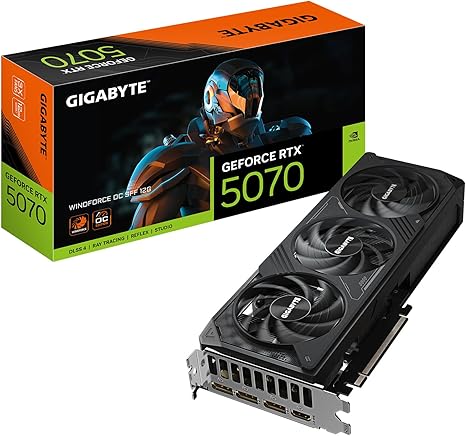
For builders chasing 1440p mainstream performance without stepping into the higher Blackwell tiers, the GIGABYTE RTX 5070 WINDFORCE OC SFF delivers efficiency in a smaller footprint. The spec sheet is straightforward: 12GB of GDDR7 on a 192-bit bus, PCIe 5.0, and DLSS 4 support thanks to the new RT Cores and Tensor Cores. The WINDFORCE cooling system uses three alternate-spinning Hawk fans, where the center fan rotates opposite the outer two. This actually reduces turbulence and noise — a smart trick more cooler designs should copy. GIGABYTE pairs that with a composite copper heat pipe setup, a large heatsink, and 3D Active Fan technology, which stops the fans entirely under low loads. As an SFF-compatible design, this card slots into compact builds the way bigger Blackwell options can’t. The realistic caveat: 12GB of VRAM is generous for 1440p but not endless. If you’re already eyeing 4K with cranked settings, the 5070 isn’t your card — that’s a different tier entirely. For 1440p high-refresh, though, this hits a real sweet spot.
10. ASRock Intel Arc A380 Challenger — Best Budget Graphic Card

This is the unapologetically budget pick on the list, and it leans into that role gracefully. The ASRock Arc A380 Challenger ITX is a tiny single-slot card with a 2250 MHz clock, 6GB of GDDR6 memory, and a striped axial fan design with 0dB silent cooling — fans only spin when temperatures climb, so light desktop use stays completely silent. Connectivity is generous for the size: three DisplayPort 2.0 ports with DSC plus one HDMI 2.0b, enabling 8K resolution output despite the modest performance class. It’s PCIe 4.0, DirectX 12 Ultimate compatible, and powered by a single 8-pin connector. The mini-ITX footprint makes it a natural fit for HTPCs, secondary builds, or compact gaming rigs where space is at a premium. The honest catch: this is a 1080p casual gaming card, not a powerhouse. Push it past lighter titles or try to chase 1440p ultra and you’ll hit a wall. But for a tiny, quiet, capable card that lets you build something genuinely compact and silent, the A380 Challenger does what it promises.
11. GIGABYTE GeForce RTX 5060 WINDFORCE OC — Best Value Mainstream Graphic Card

Value-focused but still Blackwell, the GIGABYTE RTX 5060 WINDFORCE OC is for builders who want DLSS 4 and the newer architecture without paying for tiers they won’t use. You get 8GB of GDDR7 on a 128-bit bus, PCIe 5.0, DisplayPort and HDMI outputs, plus GIGABYTE’s WINDFORCE dual-fan cooling system. RT Cores and Tensor Cores get the Blackwell-generation update, which means the AI-driven upscaling and frame generation features actually run on this card rather than being marketing footnotes. The compact dual-fan cooler suggests this card is happiest in mid-tower builds rather than tiny enclosures, but it’s still a sensible fit for most cases. The realistic caveat: 8GB of VRAM at this level in 2026 is fine for 1080p high settings, but it’s the floor, not the ceiling. If you’ve been planning to upgrade your monitor to 1440p later, consider stepping up to one of the 12GB options further up this list. For a true value mainstream pick at 1080p, though, this is where the math works.
12. ASUS Dual NVIDIA GeForce RTX 3050 6GB OC — Best Entry-Level Gaming Graphic Card

Entry-level doesn’t have to feel like punishment. The ASUS Dual RTX 3050 6GB OC keeps things simple — NVIDIA’s Ampere architecture, 6GB of GDDR6 memory, PCIe 4.0, HDMI 2.1, and DisplayPort 1.4a — and packages it into a 2-slot card under 8 inches long. The Axial-tech fan design uses 0dB technology to shut off entirely when the GPU isn’t doing heavy lifting, which is exactly what you want in a starter rig that doubles as a homework machine. Boost clock sits at 1537 MHz in OC mode and 1507 MHz default, with 2nd-generation RT Cores and 3rd-generation Tensor Cores for DLSS support — meaning even a budget build gets access to ray tracing and AI upscaling in supported games. The stainless steel bracket is a small but appreciated detail, and the card carries an IP5X dust resistance rating, which is unusual at this tier. Caveat: 6GB of VRAM is the bare minimum for modern gaming. If you can stretch even slightly higher, you’ll get more longevity. But for first-time PC builders, kids’ rigs, or anyone graduating from integrated graphics, the 3050 6GB OC opens the door without slamming it shut behind you.
Things to consider before buying:
Many gamers and content creators seek the best graphic cards to enhance their visual experience. This guide highlights twelve top-performing graphic cards that meet various needs, ensuring you find the perfect match for your system and budget.
Understanding GPU Types and Architectures
Different GPU types and architectures serve various performance needs. Key considerations include power consumption, processing speed, and compatibility with other components. Understanding these factors can help you make informed choices.
Integrated vs. Dedicated Graphics
Integrated graphics are generally found in CPUs, handling simple tasks efficiently. Dedicated graphics cards, however, focus on performance-heavy applications like gaming and 3D rendering. These distinctions significantly affect your computing experience.
Ray Tracing and AI-Driven Rendering Technologies
Ray tracing simulates realistic lighting in graphics by tracing light paths, creating stunning visuals. AI-driven rendering technologies enhance performance and improve image quality, offering immersive experiences in gaming and professional applications.
Ray tracing has transformed how visuals are rendered, introducing lifelike lighting and shadows to gaming and graphics. AI-driven technologies complement this by optimizing rendering processes, reducing resource strain while maintaining high fidelity. Together, these advancements elevate the standard of graphics, making experiences more realistic and engaging.
Essential Factors for Selecting a GPU
Selecting a GPU involves several necessary factors to ensure compatibility and performance. Consider the following:
- Your intended use: gaming, content creation, or professional tasks.
- The GPU’s VRAM and processing power.
- Cooling solutions for optimal performance.
- Brand reputation and warranty options.
The right choices can significantly impact your experience.
Resolution and Refresh Rate Requirements
Resolution and refresh rate are key for gaming and design. Higher resolutions demand more power for smooth visuals, while higher refresh rates enhance responsiveness. Match your GPU choice to your display’s specs for peak performance.
Power Supply and Chassis Compatibility
Your power supply and chassis compatibility are critical to optimal GPU performance. Ensure your power supply provides sufficient wattage and connectors, while your chassis should accommodate the GPU’s dimensions and cooling system.
Choosing a compatible power supply ensures stable operation and longevity for your system. Assess the wattage requirements of your selected GPU and account for any additional components in your build. Similarly, measure the space in your chassis, as some GPUs may require more room than standard sizes. Ensuring both components match is fundamental to maintaining a well-functioning system without overheating or power issues.
The 12 Best Graphic Cards for High-End Performance
Choosing high-end graphic cards ensures that you experience top-tier performance, particularly for 4K gaming and demanding content creation tasks. With the latest advancements in GPU technology, these cards offer unparalleled speed, enhanced graphics, and improved rendering capabilities, making them ideal for serious gamers and professionals alike.
Top-Tier Cards for 4K Gaming and Content Creation
Opting for high-end models designed specifically for 4K gaming and intensive content creation allows you to enjoy stunning visuals and buttery-smooth performance. These cards not only handle the latest games at max settings with ease but also streamline complex tasks like video editing and graphic design.
Best Mid-Range and Budget-Friendly Options
Mid-range and budget-friendly options provide excellent performance at more accessible price points. They strike a balance between quality and cost, enabling you to run most games and applications smoothly without overspending.
When looking for budget-friendly graphic cards, consider those that deliver solid performance while still being wallet-friendly. Brands often offer various models that cater to gamers who seek reliable performance in popular titles without breaking the bank. Options like the AMD Radeon RX series or NVIDIA’s GTX line are great examples, balancing capability and affordability, allowing you to enjoy a quality gaming experience without splurging on high-end models.
Evaluating NVIDIA, AMD, and Intel Ecosystems
Consider each brand’s unique ecosystem when making choices. NVIDIA excels in ray tracing and AI capabilities, while AMD offers excellent performance for multitasking. Intel is emerging in the GPU sector with integrated solutions, appealing to casual gamers and productivity users alike.
Software Features and Driver Stability
Assessing software features is imperative in determining the best graphic card for your needs. NVIDIA leads in cutting-edge technologies, AMD provides good performance at various price points, and Intel’s drivers have improved significantly. Each offers distinct advantages that may influence your purchasing decision.
Stability in drivers is a key factor when choosing a GPU. NVIDIA typically releases frequent updates with added features and optimizations, enhancing gameplay experiences. AMD has made strides in driver stability but may lag in software features compared to its competitors. Intel continues to refine its drivers, showing promise but still lacking in certain advanced options. Balancing performance and stability will guide you toward the best choice for your requirements.
Physical Hardware Mounting Procedures
Start by powering down your system, then open the case. Locate the designated PCIe slot, remove any existing graphics card, and ensure the new card is securely inserted. Fasten it with screws and connect the necessary power cables for a stable setup.
Driver Configuration and Initial Benchmarking
After installing the graphic card, boot your PC and install the latest drivers from the manufacturer’s website. Run initial benchmarks using software tools to gauge performance and adjust settings based on your gaming or creative needs.
To effectively benchmark, use tools like 3DMark or Unigine Heaven. These applications provide insights into your card’s performance under various loads. Adjust settings such as resolution and graphics quality accordingly to match your intended usage, ensuring optimal performance and efficiency during gaming or rendering tasks.
Performance Optimization and Maintenance Tips
Optimizing your graphic card’s performance is crucial for sustained high-quality visuals. Regular maintenance, updating drivers, and ensuring sufficient power supply can significantly impact functionality.
- Monitor temperature levels
- Clean dust from components
- Update software frequently
- Optimize in-game settings
The consistency of these practices will enhance your overall experience.
Thermal Management and Cooling Strategies
Efficient thermal management is crucial for your graphic card’s longevity. Invest in high-quality cooling systems and ensure proper airflow within your system to prevent overheating. Regularly cleaning fans will also contribute to maintaining optimal temperatures.
Overclocking and Software Tuning for Longevity
Overclocking can unlock additional performance but requires careful tuning. Adjust settings gradually and monitor temperatures closely to avoid potential damage. Utilize reliable software tools to make adjustments easily.
Overclocking allows you to push your hardware beyond factory settings, which can result in increased performance for demanding applications and games. Begin with small increments to avoid instability, testing performance and temperatures after each change. Monitoring tools can help track real-time metrics, ensuring you stay within safe limits. Ultimately, a balanced approach to overclocking and software tuning will help improve responsiveness without compromising your graphics card’s lifespan.
To wrap up
Taking this into account, choosing from the 12 best graphic cards ensures you find the right match for your needs. Each card on the list offers unique features and performance levels that cater to various requirements, whether for gaming, design, or general use. Make an informed decision to maximize your experience.
Leave a Reply