
Setting up the right foundation is the most critical decision you will make when building a new PC. You might be assembling a top-tier workstation to churn through massive video renders, or you could simply be putting together an entry-level rig for casual weekend gaming. Either way, the mainboard dictates what components you can run right now and what upgrade paths remain open for tomorrow.
Choosing between Intel and AMD platforms is just the beginning. You also have to balance power delivery, M.2 storage options, and networking speeds against your actual needs. This guide cuts through the marketing noise to break down the standout boards across both major chipsets, helping you match the exact features you require to the exact machine you are putting together.
Top 11 Motherboards:
1. ASUS ProArt X870E-CREATOR AMD AM5 X870E — Best Heavy User AMD Motherboard

Building a heavy-duty workstation requires a foundation that won’t buckle under sustained pressure. The ProArt X870E-Creator tackles demanding workloads head-on by outfitting the AM5 socket with 16+2+2 power stages rated at 80 amps. You are getting the kind of robust power delivery required to keep high-core-count Ryzen processors stable during marathon rendering sessions. Coming from a standard consumer board, you’ll immediately notice the massive connectivity upgrades. The rear I/O panel packs dual USB4 ports alongside both 10G and 2.5G Ethernet jacks, ensuring that moving massive video files across your local network happens in a flash.
Wireless duties are handled by a modern Wi-Fi 7 module. The aesthetic takes a sharp turn away from standard gamer hardware. It features tone-on-tone layers of black infused with metallic gold touches, presenting a clean, professional look. A translucent I/O cover even gives you a subtle peek at the premium connectors underneath. For storage, you have access to four M.2 slots, complete with ASUS’s Q-Release and Q-Slide mechanisms for tool-free installation. The primary weakness here is the onboard audio configuration; the rear panel only offers three audio jacks, meaning a full 7.1 surround setup requires routing through your case’s front panel connector.
2. ASRock Z890 Taichi — Best Premium Intel Z890 Motherboard

When you are piecing together a premium Intel system, cutting corners on the motherboard simply is not an option. The Z890 Taichi is built to maximize the LGA 1851 socket, utilizing an incredibly dense power phase configuration to keep the latest Intel processors fed during heavy overclocks. ASRock slapped large, functional heatsinks over the VRMs to pull heat away from critical components. If you have ever fought with a lack of fast storage expansion, this board fixes the issue decisively. You’ll find a staggering six M.2 slots across the PCB, including a Blazing M.2 socket wired for PCIe Gen5 speeds.
Network connectivity is equally stacked, offering a 5Gbps LAN port alongside a 2.5Gbps port, plus Wi-Fi 7 for wireless duties. Two Thunderbolt 4 Type-C ports handle high-bandwidth peripherals. Visually, the board leans into its industrial namesake with copper-colored gear images etched directly into the rear I/O shroud. The audio hardware features a high-end ESS Sabre9219 DAC with dedicated WIMA capacitors. However, there is a notable caveat on the back panel. You only get two 3.5mm analog audio jacks, so taking full advantage of a multi-channel speaker setup requires using the optical out or HDMI connection.
3. GIGABYTE X870E AORUS Master — Best High-End AMD AORUS Motherboard

Anyone who pushes an AMD chip to its absolute limits knows the value of rock-solid stability. This high-end AORUS board secures your AM5 processor with a 16+2+2 Twin Digital VRM design, utilizing 110A power stages to handle extreme demands. Everything sits on an 8-layer server-grade PCB equipped with extra copper, which aids in both signal clarity and heat dissipation. The physical build process gets a massive quality-of-life boost here. Gigabyte included an M.2 EZ-Match magnetic design that allows you to easily snap the SSD heatsinks back into place without fumbling for tiny screws.
You’ll also appreciate the PCIe EZ-Latch Plus for freeing your graphics card without scraping your knuckles against the CPU cooler. The rear I/O is fully loaded with dual USB4 Type-C ports and a Wi-Fi 7 module for cutting-edge networking. You do have to plan your expansion cards carefully. While the board offers plenty of high-speed M.2 sockets for NVMe storage, filling the lower PCIe 5.0 M.2 slots will force your primary graphics card slot to share bandwidth, dropping it down from its full x16 capabilities.
4. ASUS ROG Maximus Z890 Hero Intel — Best Flagship Intel Gaming Motherboard

Flagship builds demand hardware that refuses to compromise on power or thermal management. Built for the LGA 1851 socket, this board flexes a massive 22+1+2+2 power stage configuration. You can push top-tier Intel CPUs hard, and the board will barely break a sweat thanks to the enormous heatsink integrated right into the I/O cover, which is connected via a U-shaped heatpipe. Storage options are incredibly dense. You get three PCIe 5.0 M.2 slots and three PCIe 4.0 M.2 slots directly onboard, completely eliminating the need for add-in cards.
ASUS loaded the physical layout with builder-friendly touches, including the PCIe Slot Q-Release Slim that lets you unlock a heavy graphics card by simply tilting it toward the latch. You will also find dual Thunderbolt 4 ports, Wi-Fi 7, and a front-panel USB Type-C header capable of 60W Quick Charge 4+. The caveat lies in the physical dimensions of the thermal armor. The sheer bulk of the VRM heatsinks means you need to be very mindful of your CPU cooler clearance, especially if you plan to run a massive dual-tower air cooler instead of a liquid loop.
5. MSI MAG X870 Tomahawk — Best Mainstream AMD AM5 Motherboard

This is a solid pick if you want high-end AM5 features without paying the extreme premium of flagship tier boards. The MAG X870 Tomahawk anchors your system with a 14+2+1 Duet Rail Power System utilizing 80A smart power stages. An extended heatsink design keeps the VRMs chilled while an 8-layer server-grade PCB ensures clean signal routing. MSI included several weirdly specific, brilliant design choices to protect your hardware.
The motherboard features Avoid Collision Notification paint rings printed directly around each mounting screw hole, preventing you from accidentally scratching the PCB surface during installation. They also color-coded the internal headers, making the pump header stark white so you can find it instantly in a dark case. You’ll find dual PCIe 5.0 M.2 slots, Lightning USB 40G ports, and Wi-Fi 7 onboard. The EZ M.2 Shield Frozr II and EZ PCIe Release mechanisms make swapping parts painless. You do have to accept a slight compromise in wired networking, however. While the included 5G LAN is plenty fast for most, it does omit the 10G Ethernet capability found on more expensive creator boards.
6. ASRock PG Z790 Lightning Wi-Fi — Best Affordable Intel Z790 Motherboard

Finding a balance between performance and price on the Intel Z790 platform can be tricky, but this board threads the needle perfectly. The 16+1+1 power phase design utilizes Dr.MOS to deliver incredibly smooth power to the CPU, ensuring you maintain stability during prolonged gaming sessions or heavy multitasking. Coming from a standard gigabit connection, the Killer 2.5G LAN and Killer 802.11ax Wi-Fi 6E module will feel like a massive jump in networking responsiveness.
ASRock included a toolless multi-layer M.2 heatsink featuring a captive anti-drop screw, which is a lifesaver if you have ever lost a microscopic piece of hardware inside your power supply shroud. You also get a fast USB 3.2 Gen2x2 Type-C port on the rear panel for high-speed external drives. The main drawback centers on future-proofing your storage. The board offers three Hyper M.2 slots, but they all max out at PCIe Gen4 speeds. If you are determined to run a cutting-edge PCIe Gen5 NVMe drive at its absolute maximum theoretical bandwidth, this board will bottleneck that specific component.
7. Gigabyte Z790 Aorus Elite AX — Best Value Intel LGA1700 Motherboard

If you are assembling a rig around a 12th, 13th, or 14th Gen Intel processor, you need a board that handles intense thermal loads without flinching. The Z790 Aorus Elite AX utilizes a twin 16+1+2 phase digital VRM solution, providing the clean, sustained power delivery required to keep high-end CPUs operating smoothly under pressure. You will appreciate the physical layout when it comes time to actually build. It features a PCIe 5.0 x16 slot heavily armored for your graphics card and four separate M.2 connectors for expansive storage.
The inclusion of a Q-Flash Plus button on the rear I/O is a fantastic touch, allowing you to easily flash a new BIOS from a thumb drive without ever installing the processor or memory. Networking is handled efficiently by a Realtek 2.5GbE LAN chip alongside a modern Intel Wi-Fi 6E module. While it covers all the core enthusiast bases perfectly, it does skip a few luxury connectivity features to maintain its overall value proposition. You will not find any native Thunderbolt 4 or USB4 ports on the rear panel, which restricts your options if you rely heavily on ultra-high-bandwidth external drive enclosures.
8. ASUS ROG Strix X870-A AMD AM5 X870 ATX Motherboard — Best AMD X870 Gaming Motherboard

Visually, this motherboard is an absolute dream if you are planning a bright, white-themed build. The silver and white aluminum heatsinks cover a robust 16+2+2 power stage design, ensuring your AM5 processor has the thermal headroom it needs for aggressive clock speeds. You’re getting four M.2 slots in total, with two wired for PCIe 5.0 and two for PCIe 4.0. The rear panel is fully loaded, featuring dual USB4 Type-C ports capable of 40Gbps transfers and DisplayPort Alt mode.
ASUS also baked in Wi-Fi 7 and Intel 2.5Gb Ethernet, so you’ll never be starved for bandwidth. Quality-of-life additions like the Q-Release Slim make pulling your graphics card out of the PCIe 5.0 slot completely painless. There is a technical trade-off hidden in the storage configuration. The second PCIe 5.0 M.2 slot shares bandwidth directly with the primary graphics card slot. The moment you drop an SSD into that specific socket, your GPU lane is cut in half to x8 bandwidth.
9. ASUS TUF Gaming B650-PLUS — Best Entry-Level AM5 Motherboard

This is a highly logical starting point if you want to jump into the AM5 ecosystem without burning your entire budget on a motherboard. The TUF Gaming B650-PLUS sticks to a muted black aesthetic with subtle yellow accents, fitting cleanly into almost any case without screaming for attention. You’ll appreciate the diagnostic Q-LED array tucked along the edge of the board. It uses four specific colors—red for the CPU, yellow for DRAM, white for VGA, and green for Boot—to tell you exactly what is preventing a successful startup. You get three M.2 slots, including one wired for PCIe 5.0, which is plenty of fast storage for a standard gaming setup. A Realtek 2.5Gb Ethernet port handles wired networking duties. The compromises here are purely connected to external I/O. The rear panel lacks any native USB4 ports. You do get a Thunderbolt header on the board itself, but actually utilizing it requires you to purchase a separate expansion card down the line.
10. GIGABYTE B550 Eagle — Best Budget Motherboard
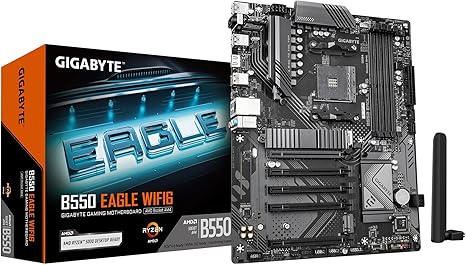
If you are assembling a value-focused AM4 rig and refuse to compromise on basic reliability, the B550 Eagle delivers exactly what you need. It manages power delivery through a 10+3 digital VRM design, giving Ryzen 5000 series processors plenty of clean energy for daily computing tasks and gaming. Gigabyte used an asymmetrical, multi-cut design on the VRM heatsinks to purposely increase the surface area and improve airflow over the power components.
You get a reinforced PCIe 4.0 x16 slot equipped with an EZ Latch mechanism to secure heavy, modern graphics cards, plus two M.2 slots dedicated to NVMe storage. A pre-installed Wi-Fi 6 module ensures your wireless connection stays consistently fast, and the Q-Flash Plus button allows for dead-simple BIOS updates without needing a CPU installed. The cost savings do eventually show up in the wired networking specifications. You are limited to a standard 1GbE LAN port rather than the faster 2.5GbE connections that have slowly become the standard on slightly more expensive boards in this same category.
11. Asus ROG Strix B550-F Gaming — Best AM4 Performance Gaming Motherboard

Squeezing the last drop of performance out of the AM4 socket requires a board that handles heat efficiently. The Strix B550-F Gaming anchors your processor with 12+2 teamed power stages and high-quality alloy chokes, ensuring absolute stability when you push a high-end Ryzen chip to its clock limits. Installation is notably smoother thanks to the pre-mounted I/O shield, which features the classic ROG eye logo and saves you from the frustration of forgetting the shield until after the board is screwed down into the case. You will enjoy excellent connectivity options, including onboard Wi-Fi 6E and an Intel 2.5Gb Ethernet port for zero-lag online matches. The board features a PCIe 4.0 x16 slot for your primary graphics card and a SupremeFX audio chipset for high-fidelity in-game sound. The primary limitation involves your storage ceiling. The board only features two M.2 slots. Once those two sockets are filled, your only options for expanding your NVMe storage involve taking up a valuable PCIe slot with an add-in card or settling for significantly slower SATA drives.
Things to consider before buying:
Choosing the right motherboard is one of the most critical decisions in any PC build. It determines what CPU you can use, how much you can expand, and how your system performs for years to come. Here’s what you need to know before buying.
Understanding CPU Sockets and Platform Compatibility
Your motherboard must match your processor’s socket and platform. AMD and Intel CPUs are not interchangeable, and using the wrong board simply won’t work. Identifying your CPU first narrows your options immediately.
AMD’s current platform is AM5, supporting Ryzen 7000 and 9000 series processors on X870E, X870, and B650 chipset boards. The older AM4 platform uses boards like the B550 and remains a budget-friendly option with no future upgrade path. Intel’s latest platform uses LGA1700, supported by Z890 and Z790 chipset boards. Z890 is Intel’s newest generation, while Z790 offers excellent performance at a lower price point.
Chipset Tiers and What They Actually Offer
Not all chipsets are created equal, and paying for a flagship board when you don’t need it wastes money. The chipset determines PCIe lane availability, overclocking support, and the number of USB and storage connections.
Flagship chipsets like X870E and Z890 offer full PCIe 5.0 support, robust VRMs for high-TDP processors, and maximum connectivity. Mid-range options like X870 and B650 hit a practical sweet spot for most users. Entry-level boards like the B550 remain capable for budget and legacy builds. Match your chipset tier to your CPU tier for the best value at every price point.
Memory Type and Speed Support
OLED panels and motherboards share one thing in common — compatibility matters more than raw specs. Buying fast RAM for a board that can’t support it is money wasted.
AM5 boards require DDR5 exclusively. Most AM4 boards support DDR4, while Intel Z890 boards are DDR5-only and some Z790 variants support either. Always check the board’s maximum supported speed and capacity alongside your RAM purchase to ensure proper compatibility.
PCIe Slots and Storage Expansion
Think beyond your current build. The number and generation of PCIe and M.2 slots determines how much you can add in the future.
Look for at least two M.2 slots for NVMe SSDs on any modern board — enthusiast-tier options often provide four or more. PCIe 5.0 M.2 support delivers significantly faster storage speeds for demanding workloads. For your graphics card, a PCIe x16 slot with Gen 5 bandwidth future-proofs your build for next-generation GPUs.
VRM Quality and Power Delivery
The VRM (Voltage Regulator Module) manages how cleanly and consistently power is delivered to your CPU. Poor VRM quality causes instability and throttling under sustained load.
Budget boards with weaker VRM configurations are fine for mid-range, locked processors but will struggle with flagship CPUs. If you’re running a high-core-count AMD Ryzen or Intel Core processor — or plan to overclock — prioritize a board with 16+ phase power delivery. This is especially important for content creators and workstation users who push their CPU hard for extended periods.
Networking and Wireless Connectivity
Modern motherboards offer substantial variation in networking quality. For home theater setups or streaming-heavy use cases, this matters more than many buyers realize.
Most boards now include 2.5GbE wired LAN as standard, with premium options offering 10GbE. For wireless, Wi-Fi 7 is the latest standard on flagship boards, delivering faster speeds and lower latency than Wi-Fi 6E. Bluetooth 5.4 is common on newer releases. If your PC will be used in a wireless-only environment, confirm the Wi-Fi generation before purchasing.
BIOS Features and Ease of Use
A well-designed BIOS makes setup significantly easier, especially for first-time builders or those installing a brand-new CPU generation.
Look for BIOS Flashback support, which allows firmware updates without a compatible CPU installed — critical when pairing new processors with older boards. Features like XMP/EXPO memory profiles allow one-click RAM speed optimization. All major manufacturers — ASUS, MSI, Gigabyte, and ASRock — offer mature BIOS ecosystems with intuitive interfaces.
Form Factor and Case Compatibility
All boards in this roundup use the standard ATX form factor, requiring a mid-tower or full-tower case. Confirm your case lists ATX support before purchasing. Smaller form factors like Micro-ATX or Mini-ITX exist but offer fewer expansion slots and are not represented here.
Budget Alignment Across the Build
- Allocate roughly 10–20% of your total build budget to the motherboard
- Pairing a budget board with a flagship CPU creates power delivery and feature bottlenecks
- Spending heavily on a motherboard for a mid-range CPU offers little real-world return
- The sweet spot for most users falls between mid-range chipsets and well-reviewed VRM quality
Final Words
Now that you understand what separates a great motherboard from an average one, you’re equipped to choose confidently. Whether you’re building a budget AM4 system, a mainstream AM5 gaming rig, or a flagship Intel workstation, defining your CPU first and matching the board tier to your actual needs will always lead to the best outcome.
Leave a Reply