
Getting into 3D printing used to mean sacrificing your weekends to endlessly calibrate a temperamental machine. Not anymore. The current lineup of desktop 3D printers has completely flipped the script, bringing professional-grade speed, precision, and automation right to your workspace. From churning out tabletop miniatures with razor-sharp details to prototyping functional engineering parts, the modern hardware ecosystem makes the learning curve far less brutal. This list cuts through the marketing noise to highlight the standout machines that actually deliver on their promises.
Top 11 Budget 3D Printers:
1. QIDI Q2 3D Printer — BEST Budget 3D Printer Overall

If you want an enclosed setup that handles serious materials without sacrificing capability, the QIDI Q2 brings a heavy-duty feature set straight to your workspace. You’ll appreciate the fully enclosed design, which pairs with a 65-degree Celsius active heated chamber to prevent warping when you tackle demanding materials like ABS. You’re getting a 270 by 270 by 256-millimeter build volume here, giving you room to stretch out on larger projects. The built-in AI camera lets you keep an eye on your prints, while the ultra air filtration system handles the unpleasant fumes that come with melting certain plastics. With a top speed of 600 millimeters per second and full auto leveling, the workflow is streamlined from the moment you hit print. Keep in mind that all this enclosed hardware comes with some serious heft. Clocking in at nearly 40 pounds, this isn’t exactly a portable machine you can easily slide into a corner. But if you have the sturdy desk space to support it, the Q2 gives you a highly capable system that feels remarkably close to industrial grade.
2. Anycubic Kobra 3 Max — Best Large-Format FDM 3D Printer

Sometimes you just need to print big, and the Anycubic Kobra 3 Max exists exactly for those supersized projects. When you tackle full-scale cosplay helmets or massive terrain pieces, stringing together smaller prints gets old fast. This machine solves that by offering a massive 420 by 420 by 500-millimeter build volume. You’ll notice Anycubic built this for high-speed operation, integrating vibration compensation to keep rapid movements from ruining print quality. The sheer scale of this bed slinger means the moving parts carry a lot of momentum, making that compensation feature critical for keeping your walls smooth when the extruder gets moving. The obvious caveat is simply the physics of the machine itself. A build volume this large requires a dedicated, oversized workstation to accommodate both the hardware footprint and the clearance needed for the moving bed. If you have the room, the Kobra 3 Max completely removes the boundaries on what you can pull off.
3. ELEGOO Neptune 4 Plus 3D Printer — Best Large Build Volume 3D Printer

The Neptune 4 Plus has a 320 by 320 by 385 build volume — life-size helmets, multi-piece costume armor, full-scale prop swords in single jobs. 500mm per second? Klipper firmware built in, no flashing on day 1. Dual gear direct drive no skipped steps for flexible filaments First layers flat at this scale from auto leveling over 121 mesh points. Your desk situation needs considerable attention, footprint is large though. For the cosplayer and prop builder who needs true scale on a real budget. Nothing else comes close for the price.
4. ELEGOO Centauri Carbon 3D Printer — Best Carbon Fiber Capable 3D Printer

Jumping into engineering-grade filaments requires hardware that can handle the heat, and the ELEGOO Centauri Carbon is built specifically for that task. You’re looking at a sleek CoreXY machine that comes ready to print right out of the box, pushing out models at a rapid 500 millimeters per second. The star of the show here is the 320-degree Celsius high-temperature nozzle. When you start working with carbon fiber blends, standard nozzles simply can’t handle the abrasive materials or the required melting points. This setup gives you the thermal overhead to push those advanced filaments smoothly. You’ll also appreciate the built-in camera, which lets you monitor those complex, high-strength prints without hovering over the machine for hours. The 256 by 256 by 256-millimeter build volume sits right in the standard desktop sweet spot, giving you a perfectly cubic space for most functional parts. While the auto-calibration feature takes the headache out of dialing in the bed, keep in mind that printing at 500 millimeters per second on a machine tailored for abrasive filaments will still require some careful slicer tuning to get your carbon fiber prints looking flawless.
5. ELEGOO Mars 5 Ultra Resin 3D Printer — BEST Budget Ultra High-Resolution 3D Printer

If you’ve been working with filament printers and want to step over into the high-detail world of resin, the ELEGOO Mars 5 Ultra makes the transition remarkably smooth. This machine is all about striking ultra-high precision, utilizing a 7-inch 9K monochrome LCD that hits a staggering 18-micron XY resolution. At that level of detail, your miniatures and display models will emerge with museum-quality textures that filament simply cannot replicate. You’ll quickly notice the tilt-release technology at work, which allows the printer to peel layers away easily and push print speeds up to a rapid 150 millimeters per hour. Setting up resin machines used to be a messy chore, but the automatic leveling and self-check diagnostics built into the Mars 5 Ultra mean you just unbox it, power it on, and get straight to creating. One unique touch is the AI-powered camera and integrated sensors that monitor your resin levels and catch errors in real time, preventing you from waking up to a failed print. If there’s a downside, it’s that maximizing the Wi-Fi cluster printing feature really requires running multiple units, which is likely overkill if you’re just using a single machine at your desk.
6. ELEGOO Mars 4 MSLA 3D Printer — Best Entry-Level Resin 3D Printer

Diving into resin printing can feel a bit intimidating, but the ELEGOO Mars 4 sets you up with a straightforward, highly capable machine that removes a lot of the initial friction. This is a solid pick if you’re just starting out, delivering incredibly sharp details thanks to the 7-inch 9K monochrome LCD. With a resolution of 8520 by 4320 pixels, you’ll achieve that razor-sharp 18-micron accuracy that makes resin prints look practically injected-molded. You’ll appreciate the laser-carved build plate. That specific textured surface dramatically enhances how well your first layers grip the metal, cutting down on those frustrating moments where your model detaches halfway through a long print. Behind the screen, an advanced COB light source provides consistent, uniform ultraviolet exposure, ensuring your models cure evenly across the entire 6.04 by 3.06 by 6.89-inch build volume. You control the entire process through a simple 3.5-inch touchscreen interface that includes a real-time progress bar. The only real limitation here is the straightforward, manual nature of the workflow. Unlike more advanced units with smart sensors, you’ll need to master the basics of resin handling yourself, but that’s exactly what makes it such a great learning platform.
7. FLASHFORGE Adventurer 5M Pro 3D Printer — Best Enclosed High-Speed 3D Printer

When speed and safety are your top priorities, the FLASHFORGE Adventurer 5M Pro delivers a lightning-fast Core XY architecture wrapped inside a clean, fully enclosed frame. You’re getting a machine that can push print speeds up to 600 millimeters per second, complete with a massive 20,000 millimeters per second squared acceleration. The all-metal frame keeps everything stable when the tool head is zipping around, preventing speed-induced vibrations from ruining your details. If you’ve ever fought with clogged hotends, you’ll love the quick detachable nozzle system. The direct extruder heats up to 200 degrees Celsius in just 35 seconds, and swapping out the 280-degree capable nozzle takes barely any time or effort. You also get the convenience of fully automatic bed leveling through a pressure sensing system that measures multiple points across the platform, totally eliminating the need for manual Z-axis calibration. The enclosed design houses a dual circulation cooling system that reduces dust and filters out particles, making it much more pleasant to sit next to while it works. The main trade-off for this tightly integrated system is the slightly constrained build volume. At 220 by 220 by 220 millimeters, it’s on the smaller side for modern machines, meaning you might have to slice larger cosplay props into multiple pieces.
8. ANYCUBIC Kobra X — Best Multi-Color FDM 3D Printer

Multi-color printing meant a Bambu price tag. Kobra X just changed the math. A single-extruder design with built-in color swapping—print up to four colors without a separate AMS unit to lug about. CoreXY frame travels at 500mm per second and prints come out looking sharp enough to skip sanding altogether. Auto-leveling handles the bed before every work, no more bowed first layers. The toolhead makes a loud clicking noise during retraction though – like someone tapping a pencil on a desk over and over. The Kobra X is the new sweet spot for those tired of single color printing but not willing to pay premium money.
9. ELEGOO Mercury Plus 2.0 — Best Budget Wash & Cure 3D Printer Station

Anyone who works with resin knows that printing the model is only half the battle; the cleanup process is where things usually get messy and complicated. The ELEGOO Mercury Plus 2.0 completely transforms that workflow, giving you a dedicated two-in-one wash and cure station that handles the sticky, chemical-heavy side of the hobby with precision. Instead of juggling plastic containers of alcohol on your desk and risking a spill, you’ll drop your prints directly into a sealed washing chamber that features an alcohol vapor lock. This fan-less operation keeps your workspace smelling fresh and drastically cuts down on the mess associated with post-processing. Once your part is completely clean, you can easily switch the machine over to the curing mode. You’ll appreciate the 16 ultraviolet LEDs paired with a 360-degree rotating turntable, which work together to ensure your models cure evenly from every angle without leaving tacky spots hidden in the recesses of your print. The entire process is managed through a sleek, intuitive TFT touchscreen display right on the front panel. It’s built with a UV-blocking lid that stops 99.95% of ultraviolet light, protecting your eyes while the LEDs do their heavy lifting. Keep in mind that this is strictly an accessory station, meaning you are limited by the physical dimensions of the washing bucket. If you eventually upgrade to a massive large-format resin printer, your biggest models simply might not fit inside this unit.
10. Bambu Lab P1S 3D Printer — Best Premium Enclosed CoreXY 3D Printer
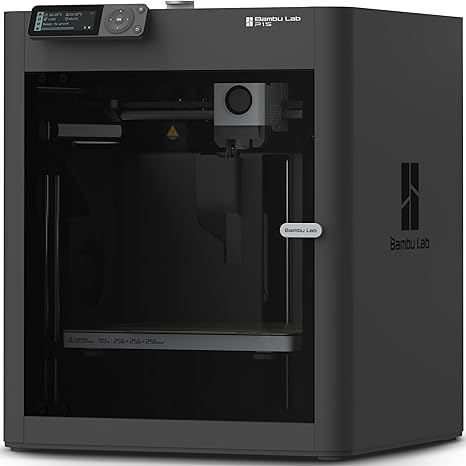
For those who are tired of endlessly tinkering with hardware and just want a machine that gets out of the way, the Bambu Lab P1S offers a highly polished, ready-to-use package. Coming from a bare-bones bed slinger, you’ll immediately notice the difference the fully enclosed chassis makes. It not only keeps the noise down but creates the stable internal temperatures required for printing temperamental materials without warping. You get a rapid 500 millimeters per second print speed driven by a rock-solid Core XY motion system, ensuring that high velocity doesn’t translate into sloppy, ringing walls on your final models. One of the standout capabilities here is the ecosystem support. The P1S is engineered to support up to 16 different colors and multiple materials automatically if you add the brand’s multi-material system later on. It handles the heavy lifting right out of the box with fully automatic bed leveling, giving you a perfect first layer without any manual dial twisting. The caveat here is that it leans heavily into a locked-down ecosystem. While the hardware gets the job done reliably, you’re buying into a highly integrated workflow. If you love heavily modifying your printer’s firmware or swapping in third-party open-source parts, the tightly controlled architecture of the P1S might feel restrictive.
11. Creality 3D Printer Ender 3 V3 KE — Best Beginner-Friendly FDM 3D Printer

Creality’s Ender line has been the starting point for countless hobbyists, and the Ender 3 V3 KE takes that familiar open-frame formula and injects it with serious modern speed. This is a brilliant entry point if you want an accessible machine that doesn’t skimp on velocity, pushing out prints at an impressive 500 millimeters per second with 8000 millimeters per second squared acceleration. You’ll appreciate how the CR Touch auto-leveling sensor handles the most frustrating part of the hobby for beginners. Instead of sliding a piece of paper under the nozzle and twisting knobs, the sensor maps the bed perfectly to ensure your first layers stick every time. Creality utilizes a ball-bearing X-axis carriage on this model, which keeps the tool head motion ultra-smooth and vibration-free even when the printer is tearing through a rapid infill pattern. To keep up with those fast speeds, the print head features dual fans and smart algorithms designed to minimize ghosting and ringing. While the 10-minute plug-and-play setup is fantastic for newcomers, the open-frame design is a limitation if you eventually want to print advanced, temperature-sensitive materials like ABS. Without an enclosure to trap the heat, you’ll be primarily sticking to forgiving filaments like PLA and PETG.
Things to consider before buying:
Most hobbyists and enthusiasts seek affordable options in 3D printing without sacrificing quality. This guide highlights the 11 best budget 3D printers available, helping you choose a reliable model that fits your needs and budget.
Understanding Primary Types of Budget 3D Printers
Fused Deposition Modeling (FDM) for Versatility
FDM printers are popular for their ease of use and material variety. They utilize thermoplastic filaments, allowing for diverse applications, from prototypes to functional parts. Cost-effective and widely available, these printers cater to both beginners and seasoned enthusiasts alike.
Stereolithography (SLA) for High-Detail Resin Prints
SLA printers excel in creating highly detailed models through a layer-by-layer curing process. This method uses liquid resin, allowing for intricate designs that traditional FDM cannot achieve. Ideal for jewelry, dental molds, and precise prototypes, SLA ensures exceptional surface quality and accuracy.
Stereolithography’s resin-based process requires careful handling and post-processing, yet the results often justify the investment. Ideal for creating detailed miniatures or prototypes, SLA can achieve resolutions as fine as 25 microns. This precision makes it a trusted choice among professionals looking to showcase intricate designs.
Critical Factors to Evaluate Before Purchasing
Evaluate key features before making a decision. Consider aspects such as pricing, warranty, and print quality to ensure you get the best value for your investment.
- Price range and budget
- Build quality and durability
- Customer support options
- Ease of assembly
- Brand reputation
Thou must assess these factors to choose wisely.
Build Volume and Print Bed Dimensions
Choosing the right build volume ensures that your projects fit within the printer’s capabilities. Larger print beds allow for bigger models or multiple prints simultaneously, enhancing efficiency.
Material Compatibility and Nozzle Temperature
Different materials require specific printing temperatures. Check your printer’s compatibility with popular filaments like PLA, ABS, or PETG, as this affects your creative options.
Understanding material compatibility and nozzle temperature helps you select a printer that meets your needs. Each filament type requires specific temperatures to achieve optimal adhesion and finish, impacting your printing experience.
Community Support and Firmware Upgradability
Strong community support can be invaluable for troubleshooting issues and sharing tips. Regular firmware updates are crucial for improving printer functionalities and extending its lifespan.
Access to active forums and user communities provides continuous learning and support. Keeping your firmware updated allows your printer to stay relevant, offering new features and improved stability over time.
Top 11 Best Budget 3D Printers of the Year
Explore the finest budget-friendly 3D printers of the year, designed to meet a variety of printing needs without breaking the bank. These selections offer impressive features, reliability, and user-friendliness, catering to both beginners and experienced users.
Best Overall Value for Beginners
The best overall value for beginners combines ease of use with affordability. This option simplifies the 3D printing experience, enabling you to focus on creativity without the hassle of complicated setups.
High-Performance Options Under $300
High-performance 3D printers under $300 deliver impressive prints while maintaining budget-friendly prices. These models strike a balance between quality and cost, ensuring you get the most out of your investment.
Priced under $300, these high-performance printers often feature advanced capabilities, such as high-resolution printing and faster speeds. Many come equipped with user-friendly interfaces and reliable support, making them an excellent choice for both newcomers and seasoned hobbyists seeking to maximize their printing experience.
Reliable Large-Format Budget Machines
Reliable large-format budget machines enable you to create impressive prints on a bigger scale without overspending. These printers cater to those looking to tackle larger projects, offering stability and performance for demanding applications.
Large-format budget machines are designed with spacious build volumes, allowing you to print larger designs or multiple parts at once. Many of these printers boast solid construction and dependable components, ensuring consistent performance and enhanced accuracy in your projects, all while staying within a tight budget.
Hardware Setup and Component Alignment
Begin by assembling the frame and attaching components like the extruder and heated bed. Ensure everything aligns correctly and screws are tightened to avoid future issues during printing.
Manual vs. Automatic Bed Leveling Procedures
Choosing between manual and automatic bed leveling can affect print quality. Manual leveling requires you to adjust the bed using screws, while automatic systems use sensors to simplify this process.
Automatic bed leveling systems are designed to enhance precision, adjusting the nozzle’s distance from the build surface in real-time. This method often reduces setup time and improves print consistency, especially for beginners dealing with varied surfaces or materials.
Slicing Your First Model and Loading Filament
Select a model, configure your slicer settings, and load the filament into the printer. Proper slicing ensures the final print adheres to your desired dimensions and quality.
Loading filament is the foundation of successful 3D printing. Ensure the filament is properly fed into the extruder, and set the slicer parameters tailored to your chosen material for optimal results. Adjust temperature and print speed settings based on the filament type to achieve the best print quality.
Advantages of Accessibility and Learning Potential
Affordable 3D printers make technology accessible to hobbyists and students. You obtain hands-on experience in design, engineering, and troubleshooting. This accessibility encourages exploration, allowing you to look into 3D printing without a massive financial commitment.
Limitations in Speed and Component Longevity
Slower printing speeds are common in budget models, impacting workflow efficiency. Components also tend to wear out faster, leading to potential maintenance issues. Limited speeds can lead to frustration, especially if you have a tight schedule. Many budget printers may take hours to complete simple designs, hindering productivity. Furthermore, frequent part replacements may be necessary, adding to the overall ownership cost. Therefore, while initial savings are enticing, the long-term usability could be compromised.
Expert Tips for Optimizing Print Quality
Achieving high print quality involves several strategies. Ensure proper calibration, adjust settings based on filament, and evaluate layer height. Utilize quality filaments and maintain the printer regularly. Follow these tips:
- Calibrate the printer before each use.
- Experiment with layer height and speed settings.
- Use high-quality filaments for better results.
Thou shalt not overlook regular maintenance for consistent output.
Enhancing Bed Adhesion and Minimizing Warp
Bed adhesion is critical for successful prints. Level the build platform accurately and select the appropriate surface material like glass or PEI. Regulate the bed temperature based on the filament, and consider applying adhesives for added support. This prevents warping and enhances print stability.
Routine Maintenance for Long-Term Reliability
Regular maintenance ensures your printer stays in top shape. Clean the nozzle frequently and check for loose belts or axes. Lubricate moving parts as needed and always update firmware to benefit from enhancements. This practice prolongs the life of your printer.
Routine tasks, such as inspecting the wiring and ensuring the hotend is clear of debris, significantly contribute to overall performance. Schedule these checks at regular intervals, and replace worn components before they fail. Doing so helps maintain consistently high-quality prints and depends on your investment in 3D printing. Stay proactive to maximize your 3D printer’s longevity and effectiveness.
Final Words
Following this guide, you can identify the best budget 3D printers that meet your needs without overspending. These options offer excellent performance and reliability, ensuring you can start your 3D printing journey efficiently. Evaluate your preferences and requirements to select the model that best complements your
Leave a Reply