
Finding the best Xbox gaming headsets shouldn’t feel like a chore when you just want to play. Are you tired of missing enemy footsteps or dealing with painful ear cups during long raids? To dominate the leaderboard, you need breathtaking spatial audio and crystal-clear communication. We have tested the top models to help you find the perfect wireless upgrade for your setup. Here are our top picks to transform your gaming experience.
Top 10 Xbox Gaming Headsets:
1. SteelSeries Arctis Nova Pro Wireless — Best Xbox Gaming Headset Overall

You’ll notice the base station before you notice anything else, and that’s where the trick hides. Two batteries live in it, but only one goes in the headset at a time. While you play, the spare charges. Swap takes a few seconds. SteelSeries calls this the Infinity Power System, and what it really means is that you stop planning your evening around a charging cable. The audio holds up its end. Premium hi-fi drivers feed the Nova Pro Acoustic System, and with Sonar software you get 360 degree spatial audio plus a pro-grade parametric EQ, which is a technical way of saying you can push footsteps forward in the mix and shove a droning generator to the back where it belongs.
Noise cancellation runs on a four-mic hybrid setup with a transparency mode, so you can seal the house out, then let it back in without pulling the headset off your head. The ClearCast Gen 2 mic slides all the way into the earcup when nobody’s talking. Bluetooth runs alongside 2.4GHz, so your phone stays in the picture. Fair warning though: there’s a real menu system here, and day one is a tinkering day.
2. SteelSeries Arctis Nova Pro X — Best Premium Xbox Gaming Headset

Wired headsets usually sit at the cheap end of the shelf. Nobody told this one. The Nova Pro X hands everything to the GameDAC Gen 2, a chunky little amplifier and control box running an ESS Sabre Quad-DAC with Hi-Res certification at 96KHz/24-bit. Translated: the signal gets cleaned up before it ever reaches your ears, so the quiet stuff stays audible when the loud stuff arrives. Honestly though, the part you’ll love daily is the OLED screen. EQ, volume, input device, ChatMix, all of it adjusts with a twist of a dial.
No app, no pausing, no fumbling. Multi-System Connect lets two systems stay plugged in at once, and you jump between them with a button, which is a small mercy if your Xbox and PC share a desk. The ClearCast Gen 2 mic kills background noise and retracts into the earcup when you’d rather not look like you’re taking support calls. PVD-coated steel, a suspension band and pivoting hangers handle the long sessions. One thing to think about first: the DAC sits between console and headset on cables, so this is a desk headset more than a couch headset.
3. Logitech G Astro A50 X — Best Multi-Console Xbox Gaming Headset
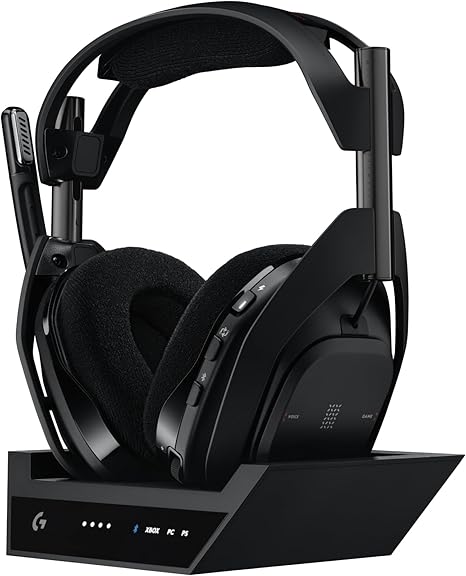
If there’s an Xbox, a PlayStation and a PC all fighting for space under your TV, this was built for your exact mess. PLAYSYNC is the reason. The base station takes HDMI 2.1 and USB from all three, then switches picture and sound together when you tap the earcup. No reaching behind the cabinet, no hunting for the right input, no losing the mood. PRO-G Graphene drivers handle clarity and separation, and LIGHTSPEED carries 24-bit audio with the kind of latency competitive players care about.
The mic runs a 48kHz LIGHTSPEED uplink, so callouts come through sharp instead of squashed and tinny the way wireless mics usually sound. Bluetooth on the base station mixes phone or chat audio into the game, and on-ear controls let you rebalance game against voice when a match gets loud and everyone starts shouting. Battery worry mostly disappears by design, since the magnetic cradle tops it up every time you set it down, and you get around 24 hours of play between sits. G HUB adds a 10-band parametric EQ if you like fiddling. The catch: it’s wireless only, with no wired fallback.
4. Razer BlackShark V3 Pro Wireless — Best Noise-Cancelling Xbox Gaming Headset

This one is aimed at people who take ranked play a bit personally, and there’s no shame in that. HyperSpeed Wireless Gen-2 gets latency as low as 10 milliseconds, which sounds like spec-sheet trivia until it’s the gap between reacting and reacting too late. The bigger news is the ANC, a first for the BlackShark family. Four microphones handle it, and they work alongside swivelling earcups and hybrid memory foam cushions that seal properly, so the room stops competing with the game.
Gen-2 TriForce Bio-Cellulose 50mm drivers do the listening work, tuned so footsteps arrive with direction and distance attached rather than as vague rustling. The mic is a detachable HyperClear Full Band 12mm unit sampling at 48kHz with a unidirectional pattern, and it comes clean off when you switch to a film. Four connection modes cover nearly everything, including 2.4GHz and Bluetooth at the same time, plus USB-C and 3.5mm. Battery runs up to 70 hours. Pro-tuned FPS profiles and your own EQs save onto the headset itself through Synapse 4. Just know the earcups don’t fold flat, so this stays at home.
5. SteelSeries Arctis Nova 7X Wireless Gen 2 — Best Mid-Range Xbox Gaming Headset
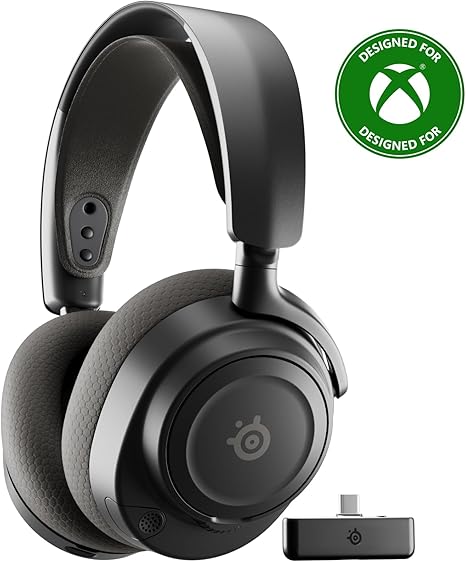
This is the sensible middle of the list, and it wears that well. Battery is the headline change, with over 40 percent more charge than the last generation, landing past 50 hours, plus USB-C fast charge for the nights you forget. Custom-designed high-fidelity drivers handle the sound, and the Arctis app brings 200-plus game-specific presets, so instead of guessing at sliders you just load the tuning for whatever you’re actually playing tonight.
The cleverest bit is quieter than that. Pair your phone over Bluetooth while the 2.4GHz dongle handles the Xbox, and you can tweak EQ mid-match without pausing anything, because both connections run at once. That same setup mixes mobile audio with game audio, so a call or a playlist sits alongside your session instead of stopping it. The ClearCast Gen 2 mic knocks background noise down by up to 25dB, which spares your squad your keyboard and your ceiling fan. The dongle is USB-C with Xbox and USB modes and a USB-A adapter in the box, which is what makes it travel between systems. Worth saying plainly: lose that dongle and the cross-platform magic goes with it.
6. Microsoft Xbox Wireless Gaming Headset — Best Official Xbox Gaming Headset

There’s a particular kind of relief in gear that just works, and Microsoft built this whole headset around that feeling. It pairs straight to the console over Xbox Wireless. No dongle, no base station, nothing extra to lose in a drawer. Bluetooth 5.3 covers PC and phone, and it holds both connections at once, so you can talk to a friend on your phone while console audio keeps running underneath. The controls are what owners actually rave about. Turn the left earcup for game and chat balance, the right for volume.
That’s it. No squinting at tiny buttons halfway through a firefight. Enhanced auto-mute and voice isolation keep your background out of party chat, which your teammates will quietly appreciate. Spatial audio support covers Windows Sonic, Dolby Atmos and DTS Headphone:X, and the Xbox Accessories app handles EQ, bass boost, mic monitoring, auto-mute and LED brightness. It’s light and flexible with an adjustable headband, so long nights don’t turn into neck ache. Battery is the honest limitation here at up to 20 hours, though 30 minutes on the cable buys you roughly four hours back.
7. Xbox Wireless Gaming Headset — Best Wireless Xbox Gaming Headset
Sometimes you want a headset that asks nothing of you. No pairing, no charging, no app that needs updating before you can hear anything. This plugs into the controller with a 3.5mm jack and works, which is the entire pitch. JBL’s QuantumSOUND Signature tuning is built to let you catch tiny details and still feel the explosions, and that balance is what turns an ambush into a warning instead of a surprise.
The boom mic is a voice-focus directional design with mute, and it detaches completely, so when you’re done with team chat you can pull it off and stop looking like air traffic control. Comfort comes from lightweight cushions made with breathable fabric over memory foam, which matters more than it sounds during hour four, when leatherette usually turns your ears into a small sauna. It’s designed for full compatibility with the native Windows Sonic surround built into Xbox, and the same 3.5mm plug moves happily between PC, PlayStation, Switch, mobile and Mac. Being analog, though, it gives you no onboard EQ and no wireless freedom. That’s the deal you’re making, and it’s a fair one.
8. Razer BlackShark V2 X Xbox Gaming Headset — Best Budget Xbox Gaming Headset
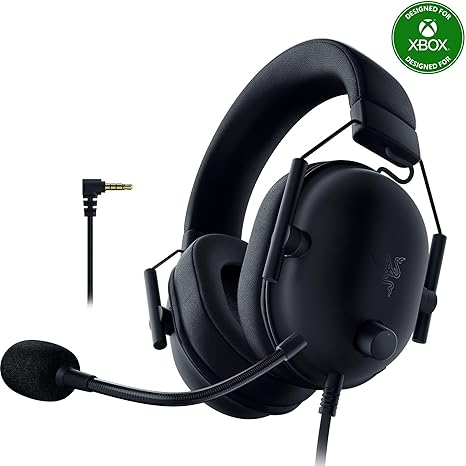
Officially licensed for Xbox and built with zero interest in being a lifestyle product, the V2 X spends its effort on the things that change results. TriForce Titanium 50mm drivers split each driver into three parts so highs, mids and lows get tuned separately, giving you brighter treble and heavier lows without the usual mush. In practice you get separation, which means bass doesn’t bury the footsteps you’re listening for.
The HyperClear Cardioid mic uses a pickup pattern that tapers off at the back and sides, so it grabs your voice and ignores your keyboard and whoever is talking behind you, and the bendable arm parks it exactly where your mouth is. Passive noise cancellation comes from closed earcups that fully cover your ears, with cushions sealing tight, and it does a surprising amount of work without needing a battery. At 240g, with thicker headband padding and leatherette memory foam, it stays comfortable through long nights. One 3.5mm cable covers Xbox Series X and S, PS5, PC and Switch. Wired only, obviously, so there’s no wireless option here at all.
9. Turtle Beach Stealth 500 Wireless Gaming Headset — Best Affordable Wireless Xbox Gaming Headset
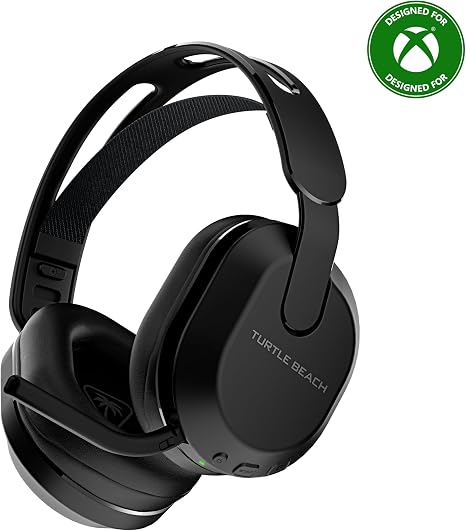
Turtle Beach set out to stretch what an entry-level wireless headset is allowed to do, and the feature list argues the case well. Low-latency 2.4GHz handles Xbox Series X, S and Xbox One, Bluetooth 5.2 covers PC and mobile, and the QuickSwitch button underneath flips between them with one press. Your game and your phone end up one button apart instead of one setup process apart. Battery runs up to 40 hours with quick charge, which for most people means charging every couple of weeks rather than every night.
Comfort comes from an ultra-lightweight build with a floating headband that spreads pressure instead of concentrating it on one spot, plus leatherette-wrapped memory foam cushions that block a bit of room noise while they’re at it. Precision-tuned amplified 40mm drivers are optimized for spatial audio, and the omni-directional flip-to-mute mic tucks neatly back into the headset when you’re done talking. The Swarm II app on PC or phone opens up a 10-band EQ, mic adjustments and firmware updates. Do note that some advanced features available over 2.4GHz may not carry across to Bluetooth mode.
10. Logitech G432 Wired Gaming Headset — Best Wired Xbox Gaming Headset

The G432 is the workhorse here, and workhorses have their own dignity. Large 50mm drivers give you a big, roomy sound with real weight underneath, so explosions land with some force instead of politely happening somewhere nearby. The 6mm boom mic was enlarged specifically so teammates can hear callouts clearly, and it flips up to mute. That flip is genuinely the best mute ever invented, because you feel it happen and never have to check whether it worked.
The leatherette earcups rotate, so the headset lies flat on your collarbone during breaks, and the slim frame keeps your neck happy through a long evening. Connections are generous for what this is: a 3.5mm cable for Xbox and mobile, plus a USB DAC in the box for PC, Mac and other platforms. On PC that DAC unlocks DTS Headphone:X 2.0, which pushes past 7.1 channels into proper three-dimensional positioning. Here’s the part Xbox owners need to hear clearly, though. DTS Headphone:X 2.0 and the EQ presets need Windows and Logitech G HUB, so on console you’re running straightforward stereo through the controller jack.
Things to consider before buying:
Critical Factors for Evaluating Audio Quality
When assessing audio quality in gaming headsets, consider several key factors that impact performance:
- Frequency Response
- Driver Size and Type
- Noise Isolation
- Microphone Clarity
Assume that these elements work together to create the immersive experience you seek in your gaming sessions.
Driver Performance and Spatial Audio Support
Focus on drivers, as they directly influence sound fidelity. Prioritize headsets that offer spatial audio support, which enhances directional sound. This feature gives you a competitive edge by allowing you to localize sound sources accurately.
Build Material, Weight, and Long-Term Comfort
Selection of materials affects durability and long-term use. Look for lightweight designs made of quality materials for both comfort and longevity. A proper fit prevents discomfort during extended gaming sessions, maximizing your experience.
Thoughtfully designed headsets use materials like memory foam and breathable fabrics to enhance comfort. Weight also plays a significant role; lighter headsets reduce fatigue, allowing longer gaming periods without discomfort. Investing in a comfortable headset ensures you remain focused on your gameplay rather than adjusting or removing your headset mid-game.
Reviewing the 10 Best Xbox Headsets
Premium Wireless Models for Enthusiasts
Investing in premium wireless models enhances your gaming experience with top-notch sound quality and advanced features. These headsets often include customizable settings and longer battery life, making them ideal for dedicated gamers seeking the best performance.
Best Value and Budget-Friendly Wired Options
Choosing budget-friendly wired options doesn’t mean sacrificing quality. Many affordable models deliver impressive sound and comfort, allowing you to enjoy your gaming without breaking the bank.
Numerous wired headsets offer significant value, providing solid audio performance and comfort at lower price points. Brands like HyperX and Razer have engineered options that maintain durability and crucial features, appealing to gamers who demand quality on a budget. These models provide a direct connection to your console, minimizing latency while keeping your costs down.
Syncing Your Headset with the Xbox Console
Sync your headset with the Xbox console by pressing the pairing button on both the headset and the console. The Xbox will automatically recognize the device, ensuring a quick connection for an immersive gaming experience.
Calibrating Windows Sonic and Dolby Atmos Settings
Adjust audio settings within your Xbox to enable Windows Sonic or Dolby Atmos, allowing for enhanced surround sound. Access the audio settings and select your preferred option for optimal sound quality while gaming.
Configuring Windows Sonic or Dolby Atmos enriches your gaming experience by providing spatial audio that enhances the sound environment. To set it up, go into the audio settings of your Xbox, select your headset, and choose between the two options. This adjustment allows for precise audio positioning, making in-game footsteps and environmental sounds clearer and more immersive.
Expert Tips for Optimizing Your Gaming Audio
Optimizing your audio settings can significantly enhance your gaming experience. Consider the following tips:
- Adjust equalizer settings for personalized sound.
- Use surround sound settings for immersive gameplay.
- Keep your headset firmware updated for performance improvements.
The goal is to create clear, balanced audio that enhances your overall gameplay.
Balancing Game Sound and Party Chat Levels
Game sound and party chat levels require careful adjustment for optimal communication. Ensure that your game audio isn’t overpowering voice chat by using your headset’s built-in balance controls. This allows you to remain engaged in both the virtual action and your conversations.
Maintenance Practices for Extending Hardware Life
Regular maintenance extends the lifespan of your headset. Clean ear cups and cables routinely to prevent dirt buildup. Store your headset in a protective case when not in use to avoid physical damage.
Using protective covers can also help shield against dust and moisture. Make sure to periodically check the cable for frays or kinks, as these issues can affect sound quality. Regularly adjusting and preserving your headset ensures it will provide quality audio for years to come.
Final Words
Drawing together the insights from the top 10 Xbox gaming headsets reveals the wide range of options available to enhance your gaming experience. Each headset offers unique features catering to different preferences, ensuring you find the perfect match for immersive gameplay. Choose wisely to enjoy superior sound quality and comfort while gaming.
Leave a Reply