
Finding the right laptop for engineering students can feel like a total nightmare when your software keeps crashing. You need massive processing power to crush complex work without draining your battery life in an hour. Don’t let a slow computer ruin your academic dreams or stall your projects. We’ve tested the top models to help you master your coursework with total confidence. Let’s find the best machines that balance speed and portability for your busy life.
Top 10 Laptops for Engineering Students:
1. ASUS TUF Gaming F16 – Overall Best

If you want a laptop that pulls double duty for engineering coursework and after-hours gaming without flinching, the TUF Gaming F16 is your workhorse. Powered by the Intel Core 5 210H processor and an NVIDIA GeForce RTX 4050 with NVIDIA Advanced Optimus, it chews through CAD renders, MATLAB simulations, and AAA titles with the same nonchalance. The 16-inch FHD+ 144Hz IPS-Level display in 16:10 aspect ratio gives you extra vertical real estate for code, schematics, and split-screen multitasking, while the 100% sRGB coverage keeps your design work color-accurate. Sixteen gigs of speedy DDR5 memory and a 512GB PCIe Gen4 SSD shrink load times dramatically. Arc Flow Fans, four exhaust vents, five heat pipes, and an anti-dust filter let it sustain performance during marathon study sessions. MIL-STD-810H durability means it can survive the chaos of dorm life, library benches, and crowded backpacks.
2. Apple 2026 MacBook Pro M5 Max – Best Mac Laptop for Engineering Students

For engineering students who live in the Apple ecosystem, the 2026 MacBook Pro with M5 Max is borderline overkill, in the best possible way. The 18-core CPU and 32-core GPU make short work of finite element analysis, MATLAB workloads, and on-device LLM inference, since each GPU core now packs a Neural Accelerator built specifically for AI tasks. The 36GB unified memory and 2TB SSD with up to twice the previous generation’s read speeds mean huge datasets and design files load instantly. The 16.2-inch Liquid Retina XDR display reveals every detail in 3D models and circuit diagrams. Three Thunderbolt 5 ports, MagSafe 3, an SDXC slot, and HDMI keep your peripherals plugged in, while the new N1 chip enables Wi-Fi 7 and Bluetooth 6. All-day battery life means lectures, labs, and library sessions never end with a dead screen.
3. ASUS ROG Strix Scar 18 (2025) – Best High-Performance Laptop for Heavy Simulations

When your engineering simulations laugh at lesser laptops, the ROG Strix Scar 18 stops them mid-chuckle. The Intel Core Ultra 9 275HX with 24 cores teamed with the NVIDIA GeForce RTX 5070 Ti turns CFD runs, SolidWorks renders, and Python-driven number crunching into background tasks. Thirty-two gigs of DDR5-5600 memory and a 1TB PCIe Gen 4 SSD pushing up to 7,000MB/s feed those components without bottlenecks. The 18-inch ROG Nebula HDR Mini LED display flexes 2.5K resolution at 240Hz, with 2,000+ dimming zones, 100% DCI-P3 coverage, and dual ACR anti-reflective layers, so spreadsheets, schematics, and after-hours games all look incredible. Cooling is the unsung hero here, with an end-to-end vapor chamber, Tri-Fan Technology, and Conductonaut Extreme liquid metal applied to both CPU and GPU, holding peak performance steady. Wi-Fi 7 keeps cloud workloads snappy, and AniMe Vision adds personality.
4. ASUS ROG Zephyrus G14 – Best Portable Powerhouse for Engineering Students
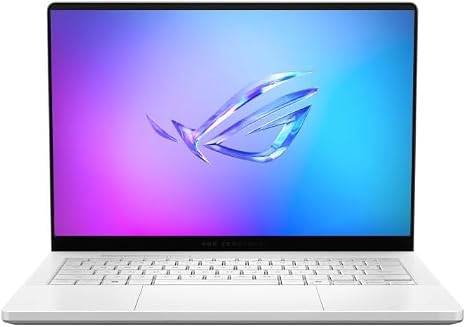
Engineering students need horsepower they can actually carry, and the ROG Zephyrus G14 delivers exactly that. The AMD Ryzen AI 9 HX 370 processor with Copilot+ AI acceleration handles parametric modeling, simulation software, and on-device AI workflows, while the NVIDIA RTX 5070 Ti laptop GPU with 12GB of VRAM tackles heavy 3D rendering and visualization without breaking a sweat. Thirty-two gigs of LPDDR5X RAM and a 1TB SSD keep multitasking buttery smooth. The 14-inch 3K OLED display at 120Hz delivers vivid contrast for design work and entertainment alike. What makes it special is the form factor, an ultra-slim 0.63-inch profile weighing just 3.46 pounds in a Platinum White finish that fits any backpack. Dual USB-C, HDMI 2.1, USB Type-A, and a UHS-II MicroSD reader cover every peripheral. Six speakers with Dolby Atmos and AI noise cancellation finish the package nicely.
5. Lenovo Legion 5i – Best Value Laptop for Engineering Students

The Lenovo Legion 5i hits that elusive sweet spot where serious engineering hardware meets reasonable expectations. The Intel Core i7-14700HX processor and NVIDIA GeForce RTX 5070 graphics deliver next-gen AI horsepower, accelerating both technical software and creation workflows. The Lenovo PureSight OLED display at 15 inches with 2.5K resolution and 165Hz refresh shows off true-to-life colors and AI-driven adjustments that keep visuals sharp during long study sessions. Lenovo AI Engine+ dynamically optimizes system settings for whatever app you throw at it, and Legion Coldfront Hyper keeps the chassis whisper-quiet under load. The Legion TrueStrike keyboard with 24-zone Lenovo Spectrum RGB delivers fast, accurate inputs for late-night coding marathons. The 13% thinner and lighter design makes class-to-class mobility painless, while USB Type-C fast charging gets you from 0 to 70% in under 30 minutes between lectures. Nahimic 3D audio rounds it out.
6. ASUS TUF Gaming A16 – Best Budget AMD Laptop for Engineering Students
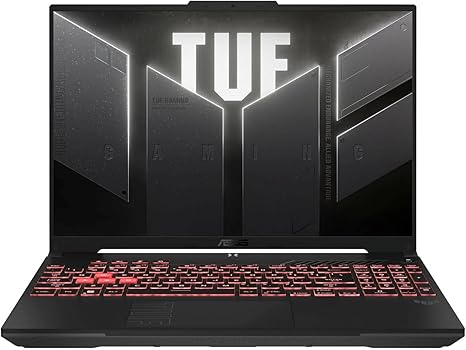
For students chasing AMD efficiency on a tighter budget, the TUF Gaming A16 stretches every dollar like a champ. The AMD Ryzen 7 7445HS processor handles compilers, MATLAB, and CAD software with surprising grace, while the NVIDIA GeForce RTX 4050 GPU adds enough graphical muscle for basic 3D modeling and rendering. Sixteen gigs of DDR5 memory and a 512GB SSD make multitasking painless, especially when you have ten browser tabs open alongside Excel and a simulation tool. The 16-inch Full HD+ display at 145Hz refresh rate gives you the screen real estate engineering work demands, with smoother scrolling than typical productivity laptops. The backlit keyboard helps with those late-night problem sets, and MIL-STD-810H military-grade durability means it can absorb the bumps of student life. Efficient cooling with Arc Flow Fans and dedicated heat pipes keeps it composed during sustained workloads, ready for whatever the semester demands.
7. Lenovo Legion Pro 5i Gen 10 – Best Pro-Level Laptop for Engineering Workloads

When you graduate from coursework to capstone projects that punish lesser machines, the Lenovo Legion Pro 5i Gen 10 steps up. The Intel Core Ultra 9 275HX with 24 cores and turbo speeds reaching 5.4GHz tears through complex simulations and parallel computing tasks, while the NVIDIA GeForce RTX 5070 Ti with 12GB of GDDR7 accelerates everything from ray-traced rendering to AI inference. Thirty-two gigs of DDR5 memory paired with a 2TB NVMe SSD configuration give you breathing room for massive project files. The 16-inch WQXGA OLED display at 240Hz with 500 nits, HDR 1000 True Black, and 100% DCI-P3 coverage delivers reference-grade color accuracy. Connectivity is generous with Thunderbolt 4, multiple USB ports, HDMI 2.1 supporting 8K/60Hz, Wi-Fi 7, and Bluetooth 5. Legion Coldfront 5.0 cooling and 24-zone RGB lighting wrap it all in a sleek, thoughtfully built chassis that handles serious workloads.
8. HP Victus 15 – Best Affordable Laptop for Engineering Students on a Budget

If your budget is tight but your ambitions aren’t, the HP Victus 15 quietly punches above its weight. The AMD Ryzen 5 7535HS processor delivers reliable multitasking for coding assignments, technical writing, and entry-level CAD work, while the NVIDIA GeForce RTX 2050 GPU offers enough acceleration to dip your toes into 3D modeling and visualization. Sixteen gigs of DDR5 RAM and a 512GB PCIe M.2 SSD keep boot times short and applications snappy. The 15.6-inch FHD display at 144Hz refresh rate is unusually generous at this tier, giving you smooth motion for both productivity and downtime gaming. A backlit keyboard with a numeric keypad streamlines spreadsheet work and late-night problem sets. Connectivity is well-rounded with two SuperSpeed USB Type-A ports, USB Type-C, HDMI 2.1, RJ-45 ethernet, and Wi-Fi 6, all wrapped in a sleek silver chassis that doesn’t scream entry-level.
9. ASUS ROG Zephyrus G14 – Best Compact Laptop for Engineering Students

Some students want power without the backpack-breaking heft, and this version of the Zephyrus G14 delivers an elite compromise. The AMD Ryzen 9 270 processor packs 8 cores and 16 threads with boost speeds up to 5.2GHz, plus a dedicated NPU pushing 50 TOPS for AI-accelerated workloads in modern engineering software. The NVIDIA GeForce RTX 5060 with 8GB of GDDR7 memory pairs nicely for ray-traced rendering and creative app acceleration. Sixteen gigs of LPDDR5X RAM and a 1TB SSD round out the internals. The 14-inch ROG Nebula OLED display at 2.8K resolution and 120Hz with 500 nits of brightness brings vivid, lifelike clarity to schematics and presentations. The CNC-milled aluminum chassis weighs roughly 3.3 pounds, with magnesium alloy reinforcement for rigidity. Wi-Fi 7 and an RGB-backlit keyboard polish the experience, making it a portable powerhouse that genuinely fits engineering life.
10. Lenovo IdeaPad Slim 3X – Best Lightweight Laptop for Engineering Students

For first-year students focused on coding, technical writing, and lecture notes more than heavy simulations, the Lenovo IdeaPad Slim 3X is a smart, no-fuss companion. The Qualcomm Snapdragon X processor with a 45 TOPS NPU makes this an AI-driven Copilot+ PC, handling multitasking, smoother video calls, and intelligent productivity features without breaking a sweat. Sixteen gigs of memory and 512GB of storage keep things responsive, and the ready-to-expand SSD slot lets you DIY more space later without service center hassles. The 15.3-inch WUXGA display with a 16:10 aspect ratio and TÜV certification gives you extra vertical room for documents while staying gentle on tired eyes. The premium metal chassis is MIL-STD 810H tested for everyday rough handling. A robust 60Wh battery with Rapid Boost technology delivers genuine all-day endurance, finally living up to those marketing promises that other laptops break.
Things to consider before buying:
Students require reliable laptops tailored to the demands of engineering coursework. This guide outlines the top 10 laptops that combine performance, battery life, and portability, ensuring you have the right tools for your studies and projects.
Critical Factors to Consider Before Purchasing
Before selecting a laptop, consider the following:
- Budget constraints
- Processor capabilities
- RAM size and speed
- Storage type and capacity
- Battery life
- Weight and portability
- Display quality
- Customer support and warranty
Perceiving these factors helps ensure a smart purchase that meets your engineering needs.
Processor Performance and Core Count
Processor choice directly influences your laptop’s performance. Opt for a multi-core processor that can handle demanding software and multitasking, ensuring efficient workflow during intense projects.
RAM Requirements for Complex Simulations
RAM plays a significant role when running complex simulations. Higher RAM allows smoother execution, enabling you to work on projects involving large datasets without lag.
Choosing a laptop with at least 16GB of RAM is advisable for engineering students. This capacity ensures efficient processing and reduces the risk of system slowdowns during heavy software operations. If your work frequently involves simulation or modeling tasks, consider options with even higher RAM, as this can significantly enhance performance and responsiveness.
Dedicated GPU vs. Integrated Graphics
Graphics options can affect rendering and precision in engineering designs. Dedicated GPUs deliver superior performance for graphics-intensive tasks, while integrated graphics might suffice for basic needs.
Dedicated GPUs excel in handling demanding visual tasks, making them vital for students engaged in 3D modeling or simulations. While integrated graphics may meet general needs, they often struggle with high-demand applications. Investing in a laptop with a dedicated GPU can vastly improve graphics performance, ensuring you can run the latest software tools smoothly and efficiently.
Common Types of Laptops for Engineering Disciplines
Different engineering disciplines necessitate varied laptop capabilities.
High-Performance Mobile Workstations
Engineers benefit from high-performance mobile workstations equipped with powerful CPUs and dedicated GPUs. These devices handle intensive simulations and 3D modeling tasks effectively. Prioritizing adequate RAM and storage enhances your workflow, making complex projects manageable on the go.
Gaming Laptops for Intensive Rendering
Gaming laptops, designed for high graphics demands, excel at intensive rendering tasks. Their advanced GPUs and high refresh rates make them suitable for rendering software and visual simulations.
These laptops feature powerful cooling systems to maintain peak performance during demanding tasks. Most offer ample storage and memory options, accommodating larger engineering projects. Gaming laptops also come with customizable settings that further enhance performance based on specific rendering requirements.
Ultra-Portable Models for Campus Mobility
Ultra-portable models are ideal for students needing mobility. Lightweight and slim designs facilitate easy transport across campus, ensuring you can carry crucial tools without straining.
Extended battery life is a hallmark of ultra-portable laptops, allowing you to work throughout the day without needing frequent charges. Their efficient performance can handle everyday tasks such as word processing, web browsing, and light coding, making them perfect for classroom settings.
Top 10 Laptops for Engineering Students
This list highlights the best laptops tailored for engineering students. These devices combine performance, durability, and design, catering to diverse needs across various engineering disciplines.
Premium Picks for Power Users
High-performance laptops offer top-tier processing power and graphics capability necessary for demanding engineering applications. These selections feature advanced specifications to handle complex simulations and rendering tasks with ease.
Best Value and Budget-Conscious Options
Affordable laptops designed for engineering students provide necessary performance without breaking the bank. These models balance cost and capabilities, ensuring you can excel academically while sticking to your budget.
Choosing a budget-conscious laptop doesn’t mean sacrificing quality. Models in this category often come equipped with solid processors and sufficient RAM, making them suitable for everyday tasks, light simulations, and basic software used in engineering studies. They represent smart investments for students who are cost-aware yet focused on their academic success.
Specialized Units for Specific Engineering Fields
Specialized laptops cater to the unique requirements of different engineering disciplines. Whether you’re in mechanical, civil, or software engineering, these models are optimized for specific applications relevant to your field.
Engineers often need tools tailored to their specific focus areas. For instance, mechanical engineers benefit from laptops with powerful CAD software capabilities, while software engineers may prioritize devices with excellent processing speeds for coding and software development. Choosing equipment tailored for your specialty ensures you have the reliability needed for your projects and coursework.
Analyzing Software System Requirements
Research the software you’ll use to ensure your laptop can handle it. Applications like CAD or simulation tools typically require more processing power and memory, so check their specific requirements before making a decision.
Balancing Portability with Battery Life
Assess how often you’ll move your laptop. Lightweight models with strong battery life provide flexibility, allowing you to work in various settings without needing frequent recharges.
Portability often comes with trade-offs. Lightweight laptops may prioritize slim designs at the expense of battery capacity. It’s important to find a balance that suits your lifestyle-choosing a device that is easy to carry yet has sufficient battery longevity for your study sessions and days on campus.
Verifying Build Quality and Thermal Management
Examine the laptop’s materials and design. A well-built laptop offers durability, while effective thermal management prevents overheating during intensive tasks, ensuring optimal performance during long study sessions.
Build quality significantly influences the laptop’s lifespan and reliability. Laptops constructed from high-grade materials resist wear and tear better. Effective thermal management systems, such as fans or heat spreaders, can help maintain performance under load, preventing throttling during extended use-an important aspect for engineering tasks that require consistent computational power.
Windows vs. macOS for Engineering Software
Choosing between Windows and macOS hinges on software availability and compatibility. Windows typically supports a broader array of engineering applications, while macOS may excel in design and multimedia tasks. Ultimately, your choice should reflect the specific tools required for your studies.
High-Resolution Displays vs. Battery Longevity
Opting for high-resolution displays enhances visual clarity, important for tasks requiring detail, yet may compromise battery life. Balance between performance and efficiency is key when selecting a laptop tailored for engineering work.
High-resolution displays offer sharper images and improved productivity for tasks such as CAD or simulations. However, they tend to consume more power, resulting in shorter battery longevity. Assessing your usage patterns will help determine if the display quality is worth the potential downtime when away from power sources.
Upgradeability and Long-Term Maintenance
Consider upgradeability when choosing a laptop, as students often need more power over time. Laptops that allow upgrades can prolong the device’s lifespan, saving costs compared to purchasing new models.
Upgradeability plays a significant role in the long-term maintenance of your laptop. Models that permit easy RAM and storage upgrades enable you to enhance performance without the expense of a new device. This flexibility can be beneficial for engineering programs, where software demands often increase throughout your studies.
Expert Tips for Optimizing Performance
Enhance your laptop’s efficiency with these expert tips:
- Close unnecessary applications.
- Regularly clean temporary files.
- Upgrade your RAM if feasible.
- Use an SSD for faster load times.
- Adjust power settings for optimal performance.
The right adjustments can lead to significant performance gains.
Managing Thermal Throttling During Heavy Loads
Cooling systems require attention, especially during intensive tasks. Ensure proper ventilation to prevent overheating. Utilizing a cooling pad can help maintain optimal temperatures, allowing your laptop to perform without throttling.
Essential Accessories for Engineering Workflows
Investing in accessories enhances productivity. High-quality external storage is key for data management. Ergonomic keyboards and mice improve comfort for long coding sessions. Noise-canceling headphones aid focus in bustling environments.
Accessories like a docking station benefit connectivity, enabling multiple peripherals and displays to be connected simultaneously. A good quality laptop stand improves ergonomics, while cable organizers keep your workspace tidy. Choosing the right tools can streamline your tasks and improve your overall workflow.
Software Optimization and Driver Updates
Regularly updating software and drivers is important for peak performance. Check for updates frequently, as they can improve functionality and fix bugs that may slow down your laptop during critical projects.
Schedule routine checks for software and driver updates to ensure compatibility with the latest applications and enhance security. Using manufacturer-supplied tools can automate this process, providing peace of mind and allowing you to concentrate on your engineering tasks without interruptions.
To wrap up
Hence, selecting the best laptop for your engineering studies can significantly enhance your academic journey. The ideal laptop combines performance, portability, and durability, ensuring you can handle demanding software and multitask effectively. Evaluate your specific needs, budget, and the features that matter most to you before making a decision.
Leave a Reply