
Finding a tablet that can handle serious gaming without overheating, lagging, or dying mid-match can feel like an endless search. You want a screen that brings every detail to life, a battery that actually survives your longest sessions, and enough processing power to run demanding titles smoothly. Whether you are looking for a massive, high-refresh-rate display for competitive play or a compact powerhouse you can throw in a backpack, the hardware landscape has shifted.
The latest models blur the line between a portable console and a traditional tablet, offering features like dedicated GPUs, active stylus support, and expandable storage. Below is a breakdown of the gaming tablets worth your attention, focusing strictly on the specs, build quality, and real-world features that matter when you just want to play.
Top 10 Gaming Tablets:
1. Asus ROG Flow Z13 — Best Gaming Tablet Overall

You rarely see desktop-level power stuffed behind a touchscreen, but the Asus ROG Flow Z13 pulls it off. This isn’t just a tablet; it’s a full Windows 11 gaming machine running an Intel Core i9-13900H processor and a dedicated GeForce RTX 4050 GPU. If you demand top-tier performance for competitive play, this hardware configuration delivers exactly that. The visual experience centers around a 13.4-inch Nebula Display with a 16:10 aspect ratio and a crisp QHD resolution. More importantly, the 165Hz refresh rate ensures that fast-paced action stays fluid and responsive.
You’ll appreciate the included detachable keyboard and active stylus support, giving you multiple ways to interact with the device whether you are gaming or sketching. Asus manages the heat from these high-end components using their ROG Intelligent Cooling system. For future upgrades, it even supports an XG Mobile eGPU docking station. The obvious trade-off for all this power and a massive 1TB PCIe SSD is the bulk. At 3.1 pounds, your arms will get tired quickly if you try to hold this up like a standard tablet, so you will definitely want to rely on a desk or your lap.
2. Microsoft Surface Pro — Best Windows Gaming Tablet

Versatility is the name of the game with the 2025 Microsoft Surface Pro. Coming in a sleek Platinum finish, it transitions seamlessly between laptop and tablet modes thanks to the built-in kickstand and detachable keyboard. Under the hood, you get a Snapdragon X Plus 8-core processor paired with 16GB of RAM and a 256GB solid-state drive. It runs on Windows 11 Copilot+, leaning heavily into built-in AI tools to help you multitask or summarize information while you play.
The 12-inch PixelSense touchscreen puts out 400 nits of brightness, ensuring that your games and media look crisp and colorful even in well-lit rooms. For streamers or anyone jumping into video chats, the front camera impressively supports up to 4K resolution. You also get up to 16 hours of battery life to keep you untethered throughout the day. One thing to keep in mind before grabbing this model is the box contents. You will find the device and a USB-C charging cable, but Microsoft does not include the actual charging brick, meaning you will need to supply your own.
3. Samsung Galaxy Tab S11 — Best Android Gaming Tablet

Jumping into the Android ecosystem, the Samsung Galaxy Tab S11 brings a remarkably sleek profile to your gaming setup. At just 5.5mm thin and weighing barely over a pound, it easily slips into a backpack. The standout feature here is the 11-inch Dynamic AMOLED 2X display. With a native resolution of 2560 x 1600, your environments will look vibrant, crisp, and incredibly detailed. Inside, a 3nm MediaTek Dimensity 9000 Series processor provides the grunt needed to handle your favorite mobile titles or stream media in 4K without breaking a sweat.
Durability is another huge plus. You get an IP68 rating, meaning this device is built to survive dust and up to 1.5 meters of fresh water. The included S Pen features a hexagonal and cone-shaped design for comfortable, precise control, while built-in Gemini Live AI integration lets you quickly summarize notes or get on-the-spot assistance. With an 8400mAh battery, you can push through up to 18 hours of usage. The only potential downside for hardcore gamers is the display’s 60Hz refresh rate, which won’t feel quite as smooth as screens designed specifically with high-framerate action in mind.
4. TABWEE Android 16 Tablet — Best 2-in-1 Gaming Tablet

If you want massive screen real estate for your games without migrating to a traditional laptop, this TABWEE model deserves a look. You are getting a huge 12.2-inch CSOT display pushing a 2400 x 1600 resolution. That high-resolution panel hits 350 nits of brightness and runs at a smooth 90Hz refresh rate, giving your animations and swift camera movements a noticeable fluidity. Since it comes with an included keyboard, you can easily shift from tapping your way through an RPG to typing up an email in seconds.
Running on the latest Android 16 operating system, the tablet is powered by an AI-enabled Unisoc T7280 octa-core processor and an integrated Mali-G57 GPU. It also packs an absolutely massive 10,000mAh lithium-polymer battery, giving you an impressive runway before you need to hunt down an outlet. For capturing moments or scanning documents, you have an 8MP front camera and a 16MP rear camera at your disposal. Just be aware that with an integrated Mali-G57 graphics processor, you might need to dial back the graphical settings on the absolute most demanding 3D games to maintain that 90Hz smoothness.
5. WXUNJA Android 16 Tablet PTB 2025 — Best Value Gaming Tablet
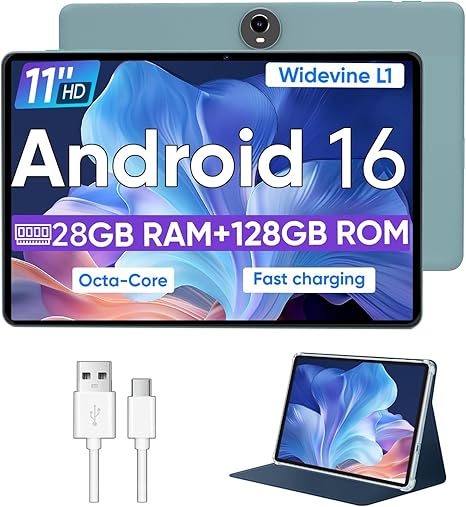
Stretching your hardware budget often means sacrificing storage or memory, but the WXUNJA C5 takes a different approach. This 11-inch Android 16 tablet is built around an Unisoc T606 octa-core processor and boasts an unconventional 28GB of RAM, achieved by combining 4GB of physical memory with 24GB of expansion. You also start with 128GB of internal storage, which you can quickly expand up to a full 1TB using the SD card slot. That means you will have plenty of room to download large game files or stockpile movies for offline viewing.
Speaking of movies, this model is Widevine L1 certified, ensuring you can stream Netflix and YouTube at proper resolutions rather than being capped at standard definition. The 8000mAh battery offers a solid 8 to 10 hours of playback time and supports 18W fast charging to get you back in the action quickly. It even retains the increasingly rare 3.5mm headphone jack, allowing you to use your favorite wired gaming headset without a dongle. The compromise here is the display resolution. At just 1280 x 800 pixels across an 11-inch LCD screen, the image will not be as razor-sharp as higher-end alternatives.
6. Amazon Fire Max 11 — Best Cloud Gaming Tablet

Sometimes you just want a reliable piece of hardware to act as a window for your cloud gaming services, and the Amazon Fire Max 11 fills that role perfectly. Built around an 11-inch IPS LCD panel with a sharp 2000 x 1200 resolution, it offers a great viewing angle and plenty of pixel density for a crisp picture. Amazon wrapped this model in a sleek gray slate design featuring durable aluminosilicate glass, giving it a premium feel in your hands.
The internal architecture relies on a MediaTek MTK8188J octa-core processor, paired with Wi-Fi 6 support to keep your connection to the cloud as stable and lag-free as possible. You also get a built-in fingerprint sensor for quick biometric security, along with 8-megapixel cameras on both the front and back. With up to 14 hours of maximum battery run time, it will outlast even your longest weekend sessions. Keep in mind that it only has 4GB of physical RAM. While that is plenty for streaming games or watching media, it limits how well the tablet can juggle multiple heavy applications running natively at the same time.
7. TCL TAB 10 Gen 4 — Best Mid-Range Gaming Tablet

Anyone who works long hours at a desk knows the value of a lightweight device for kicking back on the couch. The TCL TAB 10 Gen 4 nails portability. Weighing a mere 0.87 pounds with an ultra-slim 0.3-inch metal body, it feels excellent to hold for extended periods. The 10.1-inch FHD IPS display gives you a 1920 x 1200 resolution, enhanced by TCL’s NXTVISION technology to make the colors pop in your games and videos.
Running on Android 15, the tablet utilizes a MediaTek octa-core CPU alongside 12GB of total RAM to keep your interface running smoothly. It includes 128GB of built-in storage, but you can throw in a microSD card up to 1TB if your game library gets out of hand. You will also find practical features like Face Unlock and built-in parental controls via Kids Space. The 6000mAh battery supports 18W fast charging to get you going quickly, but be aware that TCL does not include an 18W fast charger in the box, providing only the standard USB-C cable.
8. Amazon Fire HD 10 tablet — Best Streaming Gaming Tablet

Coming from a smaller screen, you’ll immediately appreciate the vibrant 10.1-inch 1080p display on the Amazon Fire HD 10. Sporting a 1920 x 1200 resolution, it delivers brilliant color for all your streaming and casual gaming needs. Amazon built this iteration to be noticeably snappy, promising a 25 percent faster performance than the previous generation. The physical design is wrapped in a lightweight but durable chassis featuring a strengthened screen made from aluminosilicate glass, so it can handle a few bumps in your bag.
You get 32GB of internal storage out of the box, which can be expanded up to 1TB via a micro-SD card to hold massive media libraries. The battery provides a very respectable 13 hours of uptime, and the 5-megapixel front and rear cameras both support 1080p HD video recording. Operating on Fire OS 8, it connects seamlessly to your Wi-Fi and Bluetooth accessories. The catch with this base model is the lockscreen ad support; your device will display sponsored screensavers unless you go into the device settings and pay a one-time charge to remove them.
9. TABWEE W90 — Best Battery Life Gaming Tablet
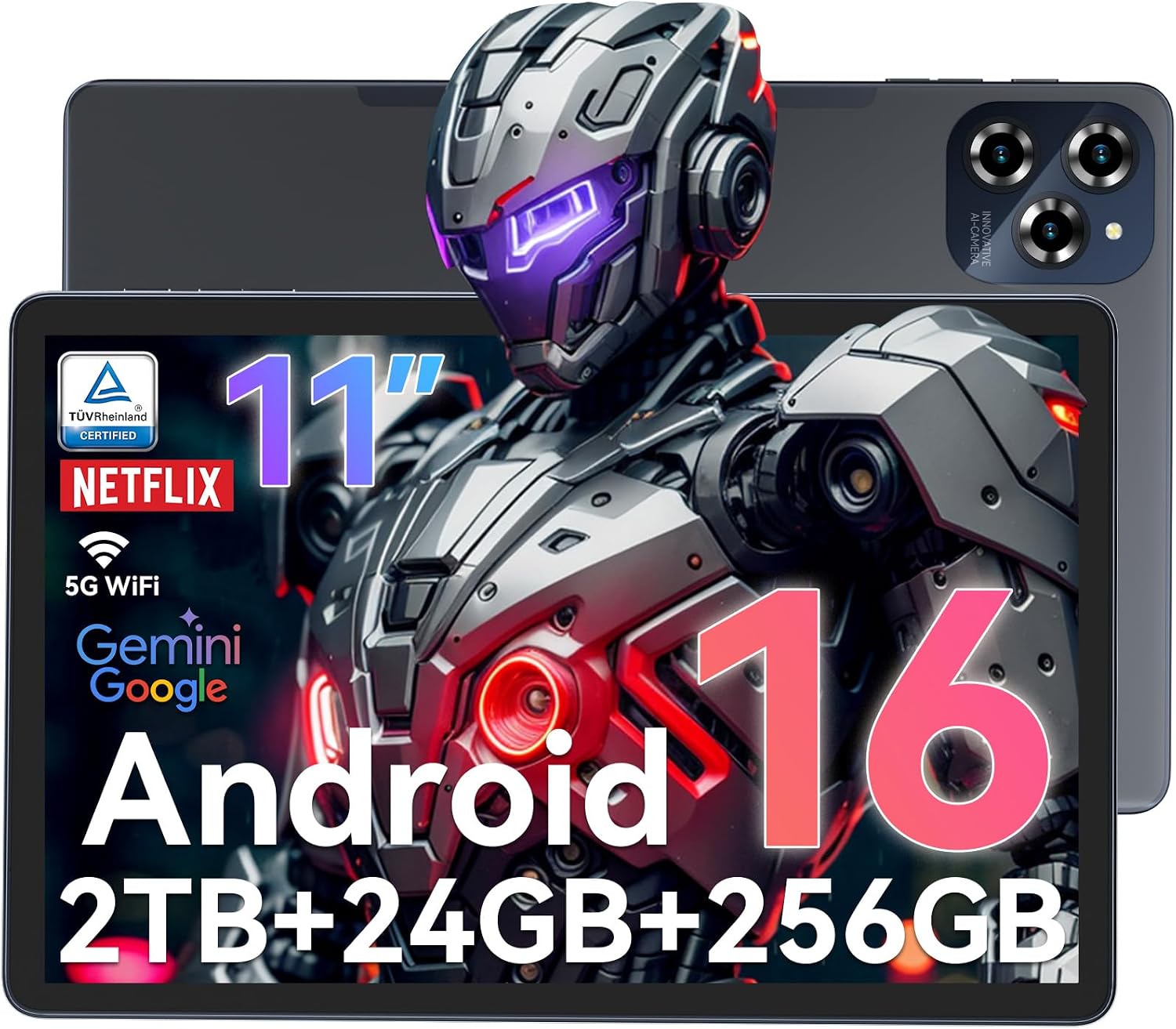
Power anxiety is the ultimate buzzkill when you’re in the middle of a raid, but the TABWEE W90 aims to eliminate it entirely. Equipped with an 8000mAh battery and a smart PowerLock feature, it promises up to 12 hours of continuous video playback. When you finally hit zero, the included 18W fast charger can pump the battery back to 50 percent in just 40 minutes.
The visual end is handled by an 11-inch FHD display at 1920 x 1200 resolution, which features TÜV-certified eye protection to reduce strain during those late-night sessions. Inside, an Android 16 environment runs on a T615 octa-core processor and an enormous 24GB of RAM, offering snappy responsiveness. You also get a generous 256GB of internal storage, which you can push all the way to 2TB using a TF card. You will appreciate the 16MP rear camera, which integrates Google Lens for real-time object recognition. However, you should note that the display uses a standard LCD panel, so you will not get the perfect, inky black levels found on OLED screens when exploring dark in-game environments.
10. SHARECLOUD P10C — Best Budget Gaming Tablet

If you want a straightforward entry into Android gaming without overcomplicating things, the SHARECLOUD P10C checks all the right boxes. Dressed in a striking blue color, this 10.1-inch tablet arrives with a protective case already included, saving you the hassle of hunting down a compatible cover. It runs on Android 15 and leverages Wi-Fi 6 along with Bluetooth 5.4 to ensure your wireless connections remain fast, stable, and current.
The internal specs feature an interesting combination of 24GB of RAM and a base 64GB of internal storage. If that storage fills up with apps and games, you can easily slot in a memory card to expand it by up to 1TB. You will get up to 8 hours of battery life, which is more than enough for a long commute or a lazy Sunday afternoon on the couch. The dual-camera setup covers your basic photography and video calling needs. The primary trade-off to keep in mind is the screen resolution; the 1280 x 800 HD IPS display is functional and bright, but it lacks the ultra-fine pixel density of full 1080p models.
Things to consider before buying:
This guide highlights the top 10 gaming tablets available today, providing you with insights into their performance, features, and capabilities. Whether you’re a casual gamer or a serious enthusiast, these tablets deliver impressive gaming experiences that cater to different preferences and budgets.
Primary Types of Gaming Tablets
- High-Performance Android Devices
- iPadOS and the Apple Ecosystem
- Windows-Based Portable Powerhouses
- Cloud Gaming Optimized Tablets
- 2-in-1 Convertibles
Assume that each type offers unique advantages suited to different gaming preferences and styles.
High-Performance Android Devices
Android tablets excel in delivering strong gaming performance, featuring high-resolution displays and customizable settings. With a robust selection of gaming apps, you can expect smooth gameplay and enhanced graphics.
iPadOS and the Apple Ecosystem
Apple’s iPad offers a tightly integrated experience, maximizing gaming performance through iPadOS. You can utilize a wide range of exclusive games and accessories, enhancing both functionality and enjoyment.
The iPadOS environment allows developers to optimize games specifically for Apple’s hardware, providing a smooth and responsive experience. You can access a diverse library of games that takes advantage of advanced features like multitasking and controllers, ensuring a high-quality gaming experience.
Windows-Based Portable Powerhouses
Devices running Windows offer near-desktop performance in a portable format. These tablets are perfect for gamers who require sophisticated graphics and multitasking capabilities.
Windows-based tablets enable you to run various high-demand games, often supporting PC-level graphics and settings. They merge the flexibility of a tablet with the power of a PC, catering to those who want both gaming and productivity in one device.
Critical Factors to Consider Before Purchasing
Evaluate key aspects before making your gaming tablet choice. Consider performance, build quality, battery life, and price to ensure it aligns with your needs. Check the gaming library compatibility to maximize enjoyment and functionality.
- Performance capabilities
- Display quality
- Battery life
- Price range
- Game compatibility
Thou must weigh each factor carefully.
Display Refresh Rates and Resolution
Focus on the tablet’s refresh rate and resolution for a smooth gaming experience. A higher refresh rate enhances fluidity, while sharp resolution brings your games to life.
Processor Benchmarks and RAM Requirements
Processor benchmarks and RAM are critical for determining performance. Higher specifications enable better multitasking and smoother gameplay.
Look for tablets with the latest processors and adequate RAM to handle demanding games. Hexa-core or octa-core CPUs provide the necessary power, while 8GB or more of RAM ensures seamless performance during intense gaming sessions. Knowing the processor’s capabilities can influence your gaming experience significantly.
Thermal Management and Cooling Systems
Thermal management is necessary for maintaining performance during extended gaming sessions. Efficient cooling systems prevent overheating.
Many gaming tablets incorporate advanced cooling solutions, such as heat sinks or fans, to dissipate heat effectively. This feature is especially important during resource-heavy gameplay, as overheating can throttle performance, leading to lag or crashes. Choosing a tablet with a reliable thermal management system ensures longevity and optimal performance.
Top 10 Gaming Tablets Ranked
Compiling the top 10 gaming tablets highlights the best choices for immersive gaming experiences. Each tablet has been evaluated based on performance, display quality, and battery life to help you find the perfect fit for your gaming needs.
Flagship Models for Professional Play
Flagship models dominate the market, offering unparalleled performance and superior graphics. These tablets feature high refresh rates, extensive storage, and powerful processors, ensuring you can play the latest titles without compromise.
Best Value and Budget-Friendly Options
Budget-friendly options make gaming accessible without breaking the bank. Discover tablets that provide decent performance and features for a fraction of the price, enabling you to enjoy gaming on a budget.
Value-oriented tablets often come with solid performance and decent graphics, making them suitable for casual gaming. Many budget models still incorporate quality displays and long battery life, allowing you to enjoy a variety of games without sacrificing too much on quality. These options are perfect for gamers looking to experience titles without a hefty investment.
Optimizing System Software and Game Modes
Adjusting system settings can drastically improve gaming performance. Start by verifying that all updates are installed. Enabling game mode helps allocate resources efficiently, providing a smoother gaming experience. Check specific game settings as well, as some titles offer additional performance enhancements.
Calibrating Display and Audio Settings
Fine-tuning display and audio settings enhances immersion. Adjust brightness, contrast, and audio levels to fit your preferences and gaming environment. Proper calibration ensures you maximize both visual clarity and sound quality, making for a more engaging experience.
Setting the display and audio optimally can have a significant impact on your gaming experience. Adjust brightness for clear visibility in varying light conditions and modify contrast to avoid eye strain. Similarly, balance audio settings by fine-tuning volume and equalization for clearer dialogues and immersive sound effects, enabling full engagement in your games.
Portability and Touch Interface Benefits
Portability allows you to game anywhere, turning commutes or breaks into entertaining moments. A touch interface enhances gameplay, providing intuitive controls that can be more engaging than traditional inputs, thereby making it easier to immerse yourself in the gaming experience.
Hardware Constraints and Compatibility Issues
Hardware limitations can restrict your gaming experience, affecting graphics and performance. Compatibility issues may arise with specific games, preventing you from playing popular titles that are available on other platforms. Awareness of these constraints can inform your device choice for a better gaming experience.
Inadequate hardware resources can also lead to lower frame rates and slower load times, diminishing your enjoyment. Many high-demand games require more robust systems to run effectively. Compatibility often becomes a concern, with some games not optimized for tablet use, limiting your options and potentially leading to frustration during gameplay.
Expert Tips for an Enhanced Gaming Experience
Optimizing your gaming sessions can significantly boost enjoyment. Consider these expert tips:
- Choose games that suit your tablet’s specifications.
- Maintain a stable internet connection for online gaming.
- Utilize in-game settings to enhance graphics and performance.
- Regularly update your device and apps.
Assume that following these guidelines will lead to a more satisfying gaming experience.
Essential Peripherals and Controller Integration
Integrating peripherals like Bluetooth controllers can enhance gaming precision and control. Investing in compatible accessories not only improves gameplay but also adds versatility for various titles.
Ergonomic Accessories for Long Sessions
Utilizing ergonomic accessories minimizes discomfort during extended play. Items such as tablet stands and cushioned grips contribute to a more comfortable experience, enabling longer gaming sessions without fatigue.
Ergonomic accessories play a significant role in promoting health during marathon gaming. Opt for stands that provide adjustable heights and angles, alongside grips that comfortably fit your hands. These adjustments help reduce strain on your neck, wrists, and back, allowing you to focus entirely on your game without physical distractions.
Summing up
Summing up, choosing from the 10 best gaming tablets enhances your gaming experience with features tailored for performance and portability. You have options that cater to different preferences and budgets, ensuring you can find a device that perfectly meets your gaming needs. Each tablet offers unique advantages, so consider your priorities before making a decision.
Leave a Reply