
It shouldn’t be hard to find the 10 finest curved monitors if you want to be fully immersed and see everything clearly. Do you hate flat panels that make your eyes hurt? If you get an ultrawide monitor, your boring workstation will become an amazing command center. We examined the best models to discover the best refresh rate for your price range. Find the best screen that will revolutionize the way you work and play for good.
Top 10 Curved Monitors:
1. Alienware AW3423DWF QD-OLED – Best Curved Monitor Overall

The gold standard for gaming displays is finally here. This 34-inch QD-OLED giant has the limitless contrast of OLED and the vivid colors of Quantum Dots. The picture is so vibrant and real that it makes other monitors look like they have dust on them. With a frame rate of 165Hz and a reaction time of 0.1ms, your games will be instant and free of blur. The 1800R curve is not too strong, but it works well to bring you into the 21:9 cinematic aspect ratio. It has a beautiful design and great build quality, making it the most important part of any high-end setup. This is the best curved monitor for someone who wants the best combination of size, speed, and image quality.
2. Samsung Odyssey OLED G9 – Best Ultrawide Curved Monitor

A 49-inch OLED beauty that appears like it came from a spaceship is in second place. The 1800R curve with the Dual QHD resolution make for a spectacular panoramic image that will take your breath away. The Neo Quantum Processor Pro analyzes and improves every frame for the best quality. It is quite slim and has a high-end metal finish that screams luxury. Also, it has smart TV functions built in, so you can move from playing games to watching your favorite shows without ever turning on your PC. It has a reaction time of 0.03 ms and a refresh rate of 240 Hz, making it a technical powerhouse that gives you the brightest colors and the darkest blacks possible in the ultrawide size.
3. Samsung Odyssey Neo G9 – Best Curved Gaming Monitor

A 57-inch giant that changed the meaning of “big” in the gaming world comes in at number three. This is the first Dual UHD monitor in the world. It has the same resolution as two 4K panels next to each other. It uses Quantum Mini-LED technology to get amazing brightness and accurate local dimming, so highlights shine and shadows stay black. It has a refresh rate of 240Hz and a 1000R curve that fits the human field of view. It’s the closest thing to VR without a headset. It’s an engineering wonder that has enough screen space to run a small country. This is the greatest Mini-LED technology and the biggest scale that makes everything else look like a toy.
4. LG UltraGear 45GR75DC – Best Free Sync Curved Monitor

Four is an absolute unit. We’re talking about a 45-inch ultra-gear monster with a DQHD resolution. It’s like two 1440p displays put together into one smooth, curved slab of perfection. It has a refresh rate of 200Hz, which is amazing for a screen this large. The VESA DisplayHDR 600 certification means it becomes bright enough to look like the sun, and the 1ms response time keeps the action clear. You can play a game in the middle and have your chat or browser open on the sides without having a second monitor. This is the monster you’ve been seeking for to finish your battle station if you want to get lost in a huge, wide-open environment with seamless FreeSync performance.
5. LG 39GX90SA-W 39-inch – Best OLED 240Hz Curved Gaming Monitor

This 39-inch OLED masterpiece is a significant deal. This isn’t just a monitor; it’s a speed demon with a 240Hz refresh rate and a crazy 0.03ms response time. The blacks are flawlessly deep since the pixels switch off when you look at them. The 800R curve is one of the most aggressive on the market. It almost hugs your face and puts you right in the cockpit of whatever you’re playing. You won’t have to see your own reflection judging you during gloomy loading screens because it has a coating that keeps glare and reflection to a minimum. The colors are so bright with VESA DisplayHDR True Black 400 that they could spoil real life for you. It’s the most immersive experience for everyone who likes speed and amazing contrast.
6. Samsung 27″ Essential S3 (S36GD) Series – Best Eye Comfort Curved Gaming Monitor

In sixth place is a monitor that cares more about your eyes than your eye doctor does. This 27-inch screen has a special Eye Saver Mode and Flicker-Free technology that will keep your eyes fresh during long sessions. It has a 100Hz refresh rate, which is a big improvement over regular workplace monitors. This makes transitions smoother and lag shorter. With a contrast ratio of 3000:1, you’ll be able to notice the monster hidden in the shadows instead of simply a grey blob. It has a sleek, simple look that works well in a home office or a gaming room. This screen has the perfect mix of health-conscious and visual performance capabilities to keep you clicking comfortably if you spend eight hours a day looking at pixels.
7. Acer Nitro 27″ Full HD Curve PC Gaming Monitor ED270R – Best Budget Curved Monitor

This 27-inch screen is a great deal for gamers who are just starting out or need a second screen they can count on. It has a Full HD VA panel with a 165Hz refresh rate, so you can enjoy that lovely curved immersion without needing a supercomputer to run it. The bezels are so thin that they are almost invisible thanks to the ZeroFrame design. This makes it a great choice for a multi-monitor configuration where the panels blend together. It has AMD FreeSync Premium to minimize screen tearing from hurting your mood, and the 5ms reaction time keeps things moving quickly. It’s a simple, no-frills display that makes the curved revolution available to everyone. It shows that you can have a stylish, immersive setup even if you don’t have a lot of money.
8. KTC 32 inch 240Hz Curved Gaming Monitor – Best Budget 240Hz Curved Gaming Monitor

If you need to go fast but don’t have a lot of money, this 32-inch competitor is the best friend you could ask for. With a refresh rate of 240Hz, it makes motion look so smooth that you’ll feel like you’re peering into the future. The HVA panel technology gives you a huge 4000:1 contrast ratio, which makes blacks really dark and menacing in horror games. It covers 120% of the sRGB color range, so your games will look bright and colorful. The 1500R curvature makes your eyes less tired, which is wonderful because we all know that “one more game” really means three more hours. This display is all about giving you that high-end, competitive edge and smooth frame rates without the extra cost. It’s quick, curvy, and ready to take over.
9. Sceptre 34-Inch Curved Ultrawide WQHD Monitor (C345B-QUT168) – Best productivity powerhouse

This is a productivity powerhouse that also serves as a movie theater. The refresh rate of this 21:9 ultrawide display is 165Hz, which is too fast for your emails but perfect for racing games. The 1500R curve is meant to seem like the natural curvature of the human eye, so you can play games for hours without feeling like you’ve been looking at a welding flame. It has built-in speakers that are actually pretty good, so you don’t have to deal with extra cords. It looks as sharp as the pictures it makes, thanks to its bright backlight and adjustable height stand. If you want to feel like you’re in an other world while doing a lot of things at once, like a caffeinated octopus with a lot of open windows, this is the best pick.
10. ASUS VG34VQL1B TUF 34 Inch Curved Gaming Monitor – Best Value for performance
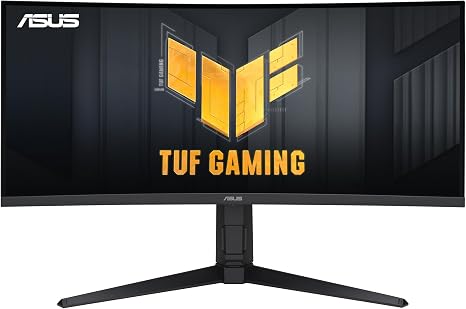
This 34-inch monster kicks off our list and shows that you don’t have to give a kidney to obtain a great ultrawide experience. This screen is smoother than a greased slide since it has a 165Hz refresh rate and a 1ms response time. It has a WQHD resolution that gives you 35% more onscreen space than ordinary HD. This makes it great for both serious gaming and pretending to work on spreadsheets. The 1500R curve wraps around your eyes and pulls you into the action, while HDR10 compatibility makes the colors burst like fireworks. You’re getting color accuracy that is as good as what professionals use and extreme Low Motion Blur technology, which is virtually cheating in competitive shooting. It’s the best “jack of all trades” that doesn’t cost a lot of money and takes care of your eyes like royalty.
Things to consider before buying:
Curved monitors have gone from being a “nice-to-have” to a must-consider option for gamers, professionals, and everyday users alike. The curved design helps match the natural shape of your eyes, offering better immersion, reduced eye strain, and a more engaging viewing experience. But not all curved monitors are created equal. Before picking one from the 10 Best Curved Monitors, here are the key factors you should carefully consider.
Screen Size & Curvature Radius
Screen size plays a huge role in how effective a curved monitor feels. Most curved monitors start at 24 inches and go up to 49 inches or more. Larger screens benefit more from curvature, especially ultrawide displays.
The curvature is measured in numbers like 1000R, 1500R, or 1800R.
-
1000R–1500R: More immersive, ideal for gaming and cinematic viewing
-
1800R–3000R: Subtle curve, better for office work and mixed usage
Choose a curvature that matches how close you sit to your screen.
Resolution Matters a Lot
Resolution directly affects clarity and sharpness. For curved monitors, higher resolution becomes more important as screen size increases.
-
Full HD (1080p): Best for budget setups and smaller screens
-
QHD (1440p): Sweet spot for gaming and productivity
-
4K or UWQHD: Ideal for professionals, creators, and ultrawide displays
If you multitask or edit content, higher resolution is always worth it.
Panel Type: VA, IPS, or OLED
The panel type determines color accuracy, contrast, and viewing angles.
-
VA Panels: Deep blacks, high contrast, great for movies and gaming
-
IPS Panels: Better color accuracy and viewing angles, perfect for design work
-
OLED (rare but premium): Best contrast and response time, but expensive
Most curved monitors use VA panels, which balance price and performance well.
Refresh Rate & Response Time
If gaming is even remotely on your radar, refresh rate is crucial.
-
60Hz–75Hz: Fine for office work and casual use
-
144Hz–165Hz: Excellent for gaming and smooth motion
-
240Hz+: Competitive gaming only
Pair a high refresh rate with a 1ms–5ms response time to avoid motion blur and ghosting.
Aspect Ratio & Ultrawide Support
Curved monitors shine when paired with wider aspect ratios.
-
16:9: Standard, widely supported
-
21:9 (Ultrawide): Great for multitasking and immersive gaming
-
32:9 (Super Ultrawide): Replaces dual-monitor setups
Ultrawide curved monitors are perfect for productivity but require desk space and GPU power.
Eye Comfort & Blue Light Features
Since curved monitors are often used for long hours, eye care features matter.
Look for:
-
Flicker-free technology
-
Low blue light or eye-saver modes
-
Anti-glare coating
These features reduce eye fatigue and make long sessions more comfortable.
Connectivity Options
Make sure the monitor supports the ports you actually need.
Common ports include:
-
HDMI (2.0 or 2.1)
-
DisplayPort
-
USB-C (with power delivery)
-
USB hub for accessories
USB-C is especially useful for laptops and clean desk setups.
Stand Adjustability & Mounting
A good stand improves comfort and ergonomics.
Check for:
-
Height adjustment
-
Tilt and swivel
-
VESA mount compatibility
If the stand is basic, VESA support allows you to upgrade to a monitor arm later.
Build Quality & Design
Curved monitors often become the centerpiece of a setup. Slim bezels, sturdy stands, and cable management add to the overall experience. Gamers may prefer RGB accents, while professionals usually go for minimal, clean designs.
Budget & Brand Reliability
Curved monitors are available at every price point. Budget models offer great value, while premium monitors deliver top-tier performance and features.
Stick with trusted brands known for:
-
Reliable panels
-
Warranty support
-
Consistent firmware updates
Paying slightly more often means better longevity and fewer issues.
Final Thoughts
Choosing the right curved monitor depends on how you plan to use it—gaming, work, content creation, or entertainment. Focus on screen size, resolution, refresh rate, and panel type first, then refine your choice with features like connectivity and eye-care technology. With the right balance, a curved monitor can dramatically upgrade your viewing experience and productivity.
Leave a Reply